Registry, strategy cards and comparison
Updated: 2026-11-14
The registry is your lab journal: every strategy, every version, every run and its result. It also feeds DSR, the honest penalty for the number of attempts you’ve made (details).
Strategies | Runs
A switch at the top of the registry changes the view. Your choice is remembered.
Strategies — one row per strategy across all markets (filtered by the market switch), with the freshest first:
| Column | Meaning |
|---|---|
| Strategy | name and market |
| Status | Idea (no runs yet) → Testing → Approved (a version is approved) → In a bot |
| Runs | how many runs it has |
| Best run | return, Sharpe and drawdown of the best run |
| Last run | the latest result and when it ran |
Expand a row to see its runs grouped by version; click a run to open it. Run starts a new backtest of the strategy; Open opens its card together with the Constructor.
Runs — every run as a table: Run · Strategy · Status · P&L % · Sharpe · Max DD · Win rate · Trades · Created · Period. Click a column to sort. In the Run column: ★ favourite, the name (repeat runs get v2, v3…), a rename pencil and an AI badge if you chatted with Gogo Adviser. Filters: status tabs (All, Queued, Running, Done, Failed, Cancelled), Favourites, and search by run, strategy or coin. While runs are active, the list refreshes itself.
Row actions: folder (move) · rocket (save as strategy, create a paper bot, or a strategy for a live bot) · restart (same config) · cancel · delete · Strategy (open this run’s strategy card). Crypto and stock runs can carry a note and a status: Approved for bot or Rejected, shown as an icon in the list.
Deleting removes a run’s trades and charts, but the attempt stays in the DSR count. The history of attempts can’t be laundered, and that’s deliberate.
The strategy card
Every strategy, for any market, has one card that tracks the path Idea → Versions and runs → Approved → Bot.
- Idea — write the Hypothesis (why should this make money?), When it works (market conditions) and a Kill criterion (when do we drop it?). Writing these down before testing is the best protection against fooling yourself.
- Versions — each distinct set of strategy parameters is a version, created automatically when you save in the editor or run a backtest. Run settings (dates, capital, fees) don’t create versions. The table shows what changed against the previous version, its runs, the best result and the status (Draft, Approved, Rejected). Tick two versions to compare only the changed parameters.
- Runs of version vN — with + Run and Compare runs.
- Readiness — a summary for the version, judged by its approval run or its best run: all green, with caveats, has failures or not checked. For Up/Down it reads the validation; for crypto and stocks, the run and the strategy gates.
- Approve vN for a bot — one version can be approved at a time. You can approve against a red summary or with no runs; the card asks you to confirm. It’s your call.
- Create bot from vN — the bot gets a frozen copy of the approved version and remembers the approval run. Later edits to the strategy don’t change it.
If you edit the strategy after approval, the card warns that the current parameters differ from the approved version. Bots stay on the approved one; run the new version before approving it.
Folders
- Inbox — everything not filed yet.
- Your folders — name, color, icon and a description. The description shows as the registry subtitle when you filter by the folder, so write the series’ hypothesis there.
- Auto folders — runs of a saved strategy land in a folder named after it; one-off runs land in a date folder.
- Archive and Junk — system folders whose contents are hidden from the main list.
Move runs by dragging a row onto a folder, with the folder button, or select several and move them together. Deleting a folder that has runs asks whether to move them elsewhere or delete them permanently.
Clean up registry removes old runs by rules combined with AND: older than N days, only certain statuses, keep the newest N per strategy, never delete favourites, also clean Archive and Junk, delete folders left empty. Nothing is deleted until you press Count, see the preview, and then Delete. Runs still computing are never deleted.
A good research habit: one folder per idea, the hypothesis in its description, one change per run, names that say what changed (“60d”, “+price filter”), ★ for candidates, the rest to Junk.
Comparing runs
Tick two or more finished runs (up to 8) and press Compare N runs.
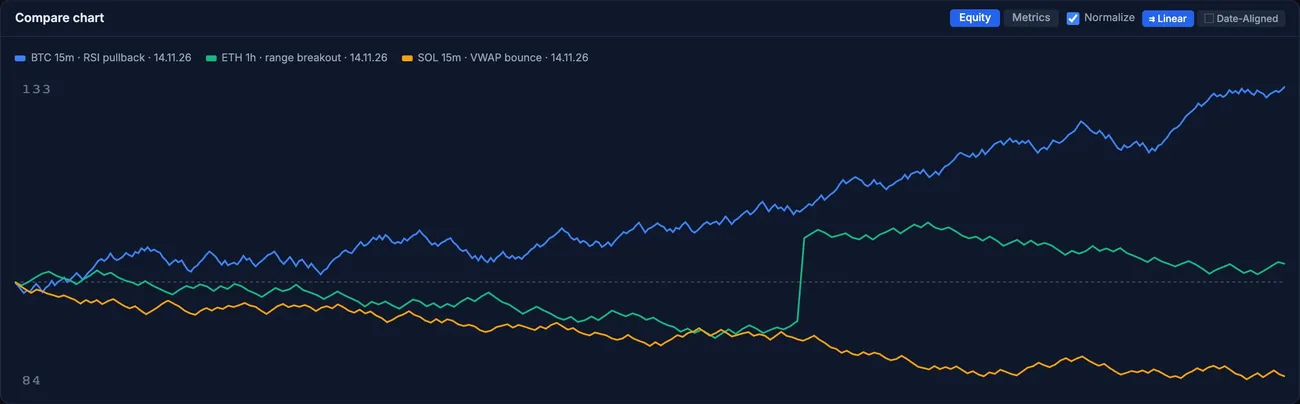 Three runs on one normalized chart. One strategy climbs steadily, one jumps once and fades, one bleeds slowly. Demo data.
- Compare chart — overlaid equity curves. Normalize puts all of them at 100 (a must when capital differs). Linear stretches each run edge to edge; Date-Aligned places them on a shared time axis.
- Delta table — P&L, Sharpe, Sortino, max drawdown, profit factor, win rate and trades; the best value in each row is highlighted, with the difference from the first run.
- Strategy params comparison — differing parameters are highlighted. This is the key to “change one thing at a time”.
- Equity correlation matrix — r near 1: the curves move together; near 0: independent; near −1: they offset. For a set of bots, pick profitable strategies with low correlation.
For crypto and stocks, the Edit and re-run layout compares the previous run with the new one automatically.
More tools for crypto and stocks
- Batch runs — one strategy over many tickers and periods (up to 30 runs). The summary says “Works on X of Y”: return above zero and better than holding. It shows where a strategy works and where it doesn’t.
- Portfolio of runs — several finished runs combined in equal shares over their common days, with the correlation of daily returns: below 0.3 diversifies, 0.3–0.7 partly, 0.7+ duplicates.
Bot vs backtest
Does the bot behave like its backtest? Bot vs backtest runs the bot’s strategy over the bot’s own dates and capital and compares the curves day by day: return, drawdown, trades, the daily gap and tracking error. The verdict says whether the bot tracks the backtest or diverges. Up/Down bots get the same comparison as Backtest vs Paper Bot (or vs Live Bot).
Don’t expect a perfect match. The bot slightly below the backtest is normal. Backtest positive while the bot steadily loses means the strategy lives on idealized fills: tighten spread and liquidity filters. Far fewer bot trades than backtest trades means the head-to-head comparison isn’t valid yet.