Paper, dry run and live
Updated: 2026-11-14
No bot on GoGoBots trades real money until you say so. Every bot type has at least one stage that runs on live market data without your money: paper, dry run or simulation. The step to real money is always a separate action that you confirm yourself. This article explains what each stage is for and how the step to live works for each bot type.
The risk ladder
The recommended path is the same for every market:
Strategy → Backtest → Paper → Dry run → Live
| Stage | Data | Money | What it answers |
|---|---|---|---|
| Backtest | History | None | Would these rules have worked in the past? |
| Paper | Live prices | Virtual balance | Do the rules still fire and behave as expected now? |
| Dry run | Live prices, through the real bot engine | None | Does the whole live pipeline work: wallet or account, signals, orders, logs? |
| Live | Live prices | Yours | What does it actually earn or lose after fees and slippage? |
None of the stages is forced, but each one catches problems the previous one can’t see. A great backtest that falls apart on paper just saved you money. The bot wizard follows the same order: Strategy → Backtest → Dry-run → Live (see My bots).
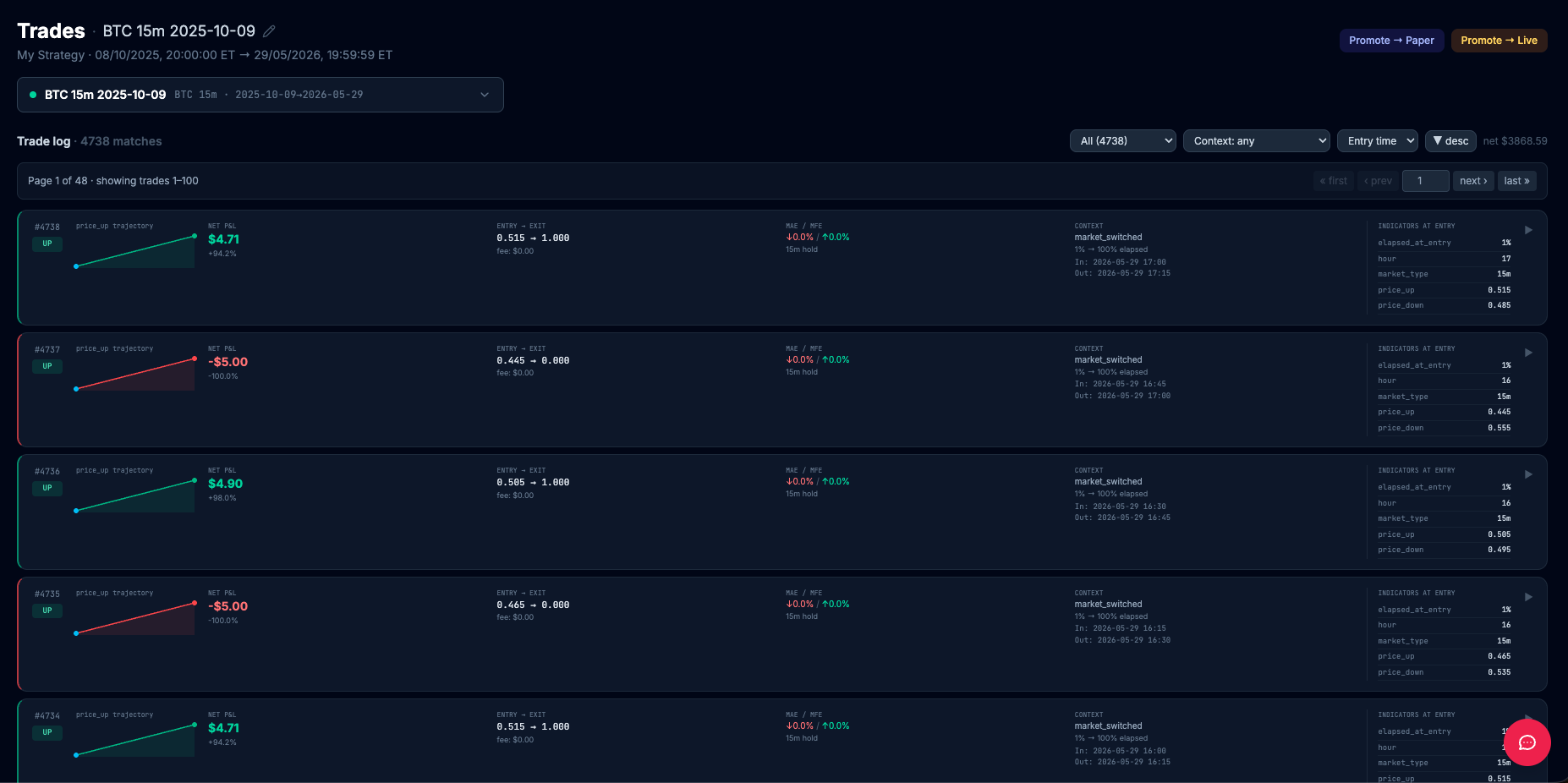 A finished Up/Down backtest: from its trade log you can promote the strategy to a paper bot or a live bot. Demo numbers.
What each stage proves, and what it doesn’t
- Paper and dry run prove the logic. The bot reads the real market, makes the same decisions and records trades to its own ledger.
- They don’t prove execution. No real order meets a real order book, so there’s no queue, no partial fill and no slippage at your size. On exchanges, margin and liquidation aren’t tested either.
- A good paper result is a reason to try live with a small amount. It isn’t proof that the bot makes money.
Let a paper or dry-run bot trade long enough to collect many trades in different conditions. Compare it with the backtest: trade count per day, share of winners, average trade. If it behaves differently, fix the strategy first. Real money won’t fix it.
How it works by bot type
Polymarket Up/Down bots
- Paper bot. Runs your strategy on live Up/Down prices with a virtual starting balance (default $100). You start it for a fixed term, such as a week. The terms you can choose depend on your plan. Before the start you confirm that the bot stops by itself on the end date, that the bot and its history are kept, and that a results brief comes by email weekly and at the end. To keep going, start it again.
- Dry run. The real bot engine runs on a shared dry-run wallet and records shadow fills without signing any orders. The dry-run wallet must hold less than $1. If real money lands on it, the start is refused and running dry-run bots on it stop. That way a “test” bot can never place real orders.
- Live. The bot trades from your own Polymarket wallet. Before going live you check the wallet balance, the starting capital and two limits: Max drawdown, % and Daily loss limit, %. Then you tick I understand: the bot will trade real money from this wallet and press Switch to Live. The same bot keeps its history. See Up/Down bots.
Copy bots
You choose the mode on every start: DRY RUN or LIVE. The mode isn’t saved as a setting, so a stopped bot always offers both. Dry run mirrors the leader with no orders and no money, and it’s the cheapest way to see how many signals your settings let through.
Before a live start, the platform checks whether the bot is ready: a simulator run on these exact settings and a measured dry run. If something is missing, you see The bot has not passed the checks with the list. You can still go ahead with Start anyway. That’s your call, made knowingly. See Copy bots.
Arbitrage bots
Every new arbitrage bot is created stopped and in simulation. Its card says “virtual money”. It reads the market, runs the same selection and pre-entry checks and records deals, but sends no orders. Switch to live asks for confirmation: from then on the bot places real orders on your exchanges, and filled orders can’t be undone. You can switch modes only while the bot has no open deals, and live trading needs at least one connected exchange key. Back to simulation works the same way. See Arbitrage bots.
Strategy bots for crypto and stocks (DCA, grid, rules)
- Paper runs on the Internal paper account (no keys, a virtual balance you set) or on a broker’s paper account or exchange testnet.
- Live runs on your exchange or broker account and needs three limits: max orders per day, max position as % of capital, and max daily loss. The start shows Start with REAL money?. You tick I understand the risk and confirm trading with real money and press Start LIVE. If the strategy hasn’t passed the strategy check, a red notice and a second tick are added.
- On live, the first order that opens a position is cut to First order, % of capital (5% by default). The path to the exchange is proven on a small amount first.
See DCA and grid bots.
Before you go live: a checklist
- The backtest covers a long period and enough trades, and it holds up in validation. See Backtest checklist.
- The paper or dry-run result looks like the backtest.
- You know why the strategy should earn, not just that it did.
- The bot’s own loss limits are set. An empty limit means no limit.
- You start with an amount you’re ready to lose. The engine has never traded on your wallet or keys before.
- Exchange keys have no withdrawal permission. See Exchange keys.
Limits and risks
- Live results include fees and slippage that paper can only estimate. Expect live to be somewhat worse.
- A limit stops new trading when it’s reached. It doesn’t guarantee the loss stays at that number: prices can gap past it.
- You can stop any bot at any time, and the Emergency stop halts everything at once.