Scanner
Updated: 2026-11-14
The Scanner is where you look for ideas before you put money to work. It covers every market on the platform: Polymarket prediction markets, crypto exchanges, US stocks and options. Every scanner only reads market data, so nothing you do here places an order. When an idea looks worth a closer look, you take it to Terminal Turbo to trade by hand, or to the Backtester and then to a bot.
Where to find it
Open Scanner in the main menu. Open Scanner →
The Scanner is a desk: a screen of free-floating windows, built the same way as Terminal Turbo. You decide which windows are open, how big they are and where they sit. The layout is saved to your account, so it follows you to other devices.
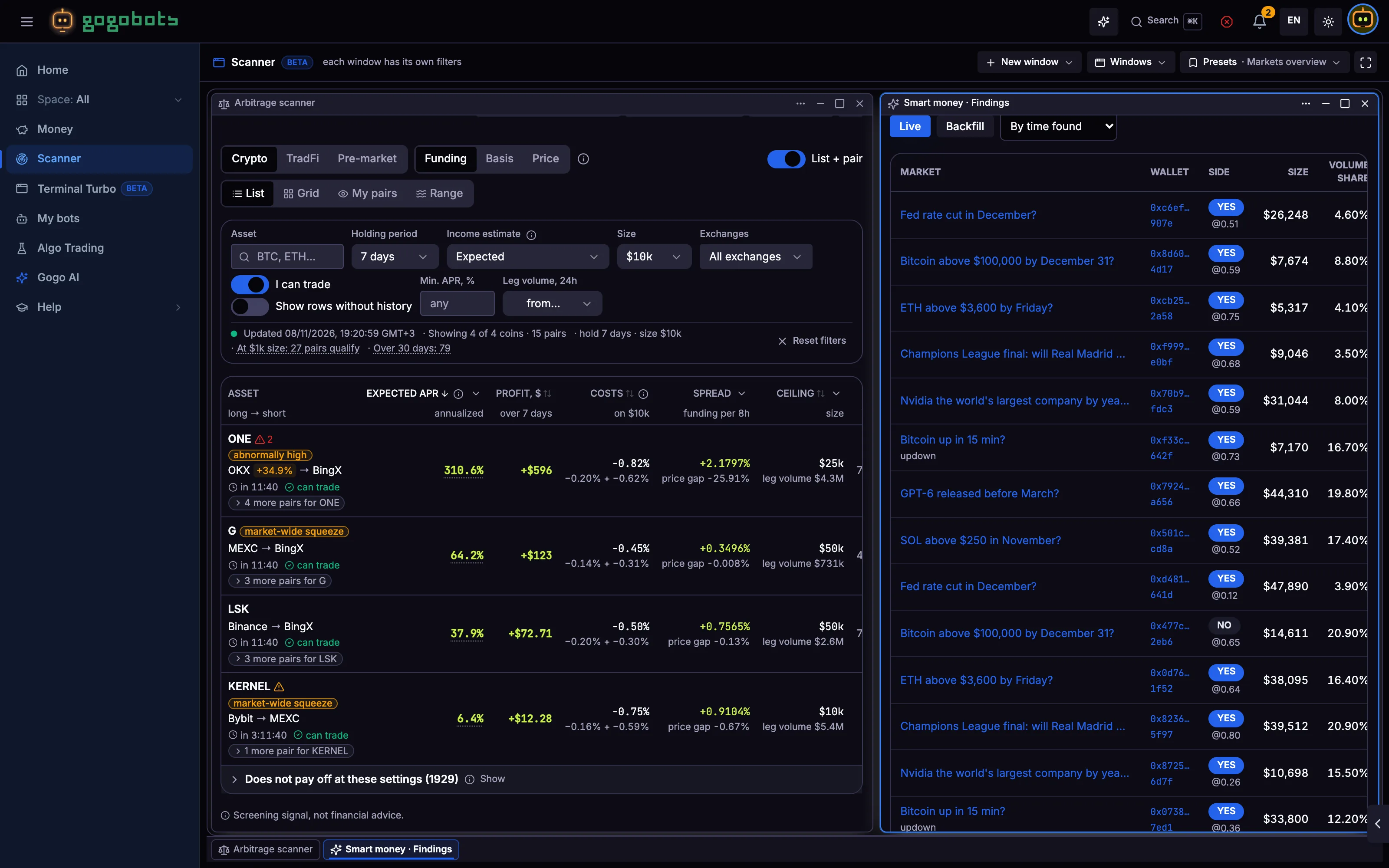 The Scanner desk: two windows side by side, each with its own filters.
The header
| Control | What it does |
|---|---|
| New window | Opens the window catalog, grouped by market. |
| Windows | Lists the open windows so you can bring one to the front. |
| Presets | Ready-made layouts plus your own saved ones. Save as my preset… stores the current layout. |
| Full screen | Hides everything except the desk. |
Each window has its own filters. Changing a filter in one window doesn’t affect the others, unless you’ve linked them on purpose (see below).
What you can scan, by market
The New window catalog is grouped by market. Inside each market, windows are sorted into three steps: What’s happening now, Find an idea and Drill into one.
| Market | What’s happening now | Find an idea | Drill into one |
|---|---|---|---|
| Polymarket | Smart money · Findings, Smart money · Events | Smart money · Markets, the Polymarket event catalog and market filter | Smart money · Scan, Leaders |
| Crypto | — | Arbitrage scanner, Order flow, crypto filter | Pair, Coin · order flow, Signal feed |
| US stocks | Market now | Stock screener | Stock card |
| Options | Gamma monitor (GEX) | — | Instrument gamma, Gamma signals |
At the top of the catalog, ★ Mine holds Whole scanner and Saved · All.
Each scanner has its own article: Smart money, Finding leaders to copy, Arbitrage scanner, Order flow, Gamma exposure and Stock scanner.
Presets
| Preset | What it opens |
|---|---|
| Classic | The whole scanner in one window: a market switch, with that market’s sections on the left. This is the starting layout. |
| Overview | Your saved items, smart money findings and the arbitrage scanner. |
| Polymarket | Findings, smart money markets, leaders and the event catalog. |
| Arbitrage | The scanner, your pairs and a pair breakdown. |
| Order flow | The table, the signal feed and a coin, for crypto perpetuals. |
| Stocks | Market now, the screener, a stock card, and the watchlist with alerts. |
| Options | The gamma monitor, one instrument and the signal feed. |
A preset only arranges windows. Switching presets never deletes anything you saved.
The whole scanner in one window
The Whole scanner window (the Classic preset) puts everything into one place:
- On the left, pick a market: Polymarket, Crypto, Stocks or Options. ★ Saved sits next to them.
- Below the switch is the list of that market’s sections. Click one and it opens on the right, working exactly like its own window.
- Click a row in any section (a market, coin, pair, stock or option instrument) and it becomes Current. Its details open in a panel on the right.
- At the bottom, Trade in Turbo → opens the current instrument in Terminal Turbo. Backtest → starts a new backtest for this market.
A few extras: ⧉ pops a section out into its own window. Pin market turns the sections into tabs, with the market name in the window title. + Another market window opens a second Whole scanner window so you can watch two markets at once.
Linked windows
Windows of the same family follow one selection. Click a coin in Order flow and the Coin · order flow window next to it switches to that coin. Pick a stock in the screener and the Stock card shows it. When you open a new window from inside a window (a market X-ray, a wallet profile, a leader card or a pair page), it opens as a new window next to the original rather than replacing it.
From idea to action
Every idea can go two ways, and both are equally valid:
- Trade manually. Use Trade in Turbo →, Trade in terminal (on a Polymarket market X-ray) or Trade manually (on an arbitrage pair). Turbo opens with the instrument already loaded. See Terminal Turbo.
- Automate. Use Backtest →, Backtest → bot (stocks), Bot on this filter (arbitrage) or Create Copy Bot (leaders). Test the idea on history first, then run it as a paper bot, and only then with real money. See Backtester and My bots.
Live trading always needs your explicit confirmation. Nothing in the Scanner starts a live order for you.
Saving what you find
Star a market, follow an arbitrage pair, add a wallet to your leaders list, save a stock screen or set an alert. Everything you keep ends up in one place, Saved. See Saved items and alerts.
Keep in mind
- A scanner row is a screening signal, not advice. Every number is an estimate built from public data, and each screen tells you what it can’t see.
- Some data comes with a delay. US option chains and stock snapshots are about 15 minutes behind, for example. Each window labels its own source.
- An idea that looks good in a scanner can still lose money once fees, slippage and timing are counted. Test it before you size it.