The bot card
Updated: 2026-11-14
Every bot has a card: one screen that answers three questions. Is it making money? Is it running without failures? What is it doing right now? Each type keeps its own detail: an Up/Down bot shows signals and orders, a copy bot shows the leader’s trades, an arbitrage bot shows two-leg deals. But every card starts with the same header and the same metric definitions, so you can compare any two bots.
Where to find it
Click a bot’s name in any bot list on My bots, for example All bots. On the My bots desk, the card opens as a new window next to the list. Open All bots →
The common header
| Field | What it means |
|---|---|
| Status | running, degraded or stopped |
| In work | Money in open positions or deals right now |
| P&L | Realized plus open result, net of exchange fees and funding, since launch |
| Today | Result of trades closed since 00:00 UTC |
| Drawdown | The largest fall of the cumulative result from its peak, in dollars |
| Return | P&L against the bot’s starting capital. Arbitrage bots have no starting capital, so no return. |
| Trades | closed · open |
| Stop / Start | Controls the bot. Paper bots are started from their own screen, because they need a run term. |
The header counts only the bot’s current mode: a bot on dry run shows dry-run results, never mixed with live. Open P&L unavailable means the open result couldn’t be read right now. It doesn’t mean zero.
A bot’s P&L is its own bookkeeping. It doesn’t have to match Capital and positions or the Journal exactly. Those screens look at your accounts, where several bots and your manual trades can share the same wallet or exchange position.
What each type adds
Up/Down and paper bots
Tiles for start and current equity, trades, win rate, P&L, open positions and runs, plus separate Up (long) and Down (short) results.
| Tab | What’s there |
|---|---|
| Chart | The Polymarket Up/Down prices and the coin’s price with every entry and exit marked |
| Equity Curve | Equity over time, with initial capital, current equity, total P&L and max drawdown |
| Trades | Closed trades with net P&L and fees |
| Positions | What the bot holds now: market, side, size, entry price |
| Orders | Every order with its signal type, reason, prices and status |
| Strategy | The strategy the bot runs |
| Logs | The bot’s live log |
| Configuration | The bot’s own settings |
| Runs | Each start of the bot as a separate run |
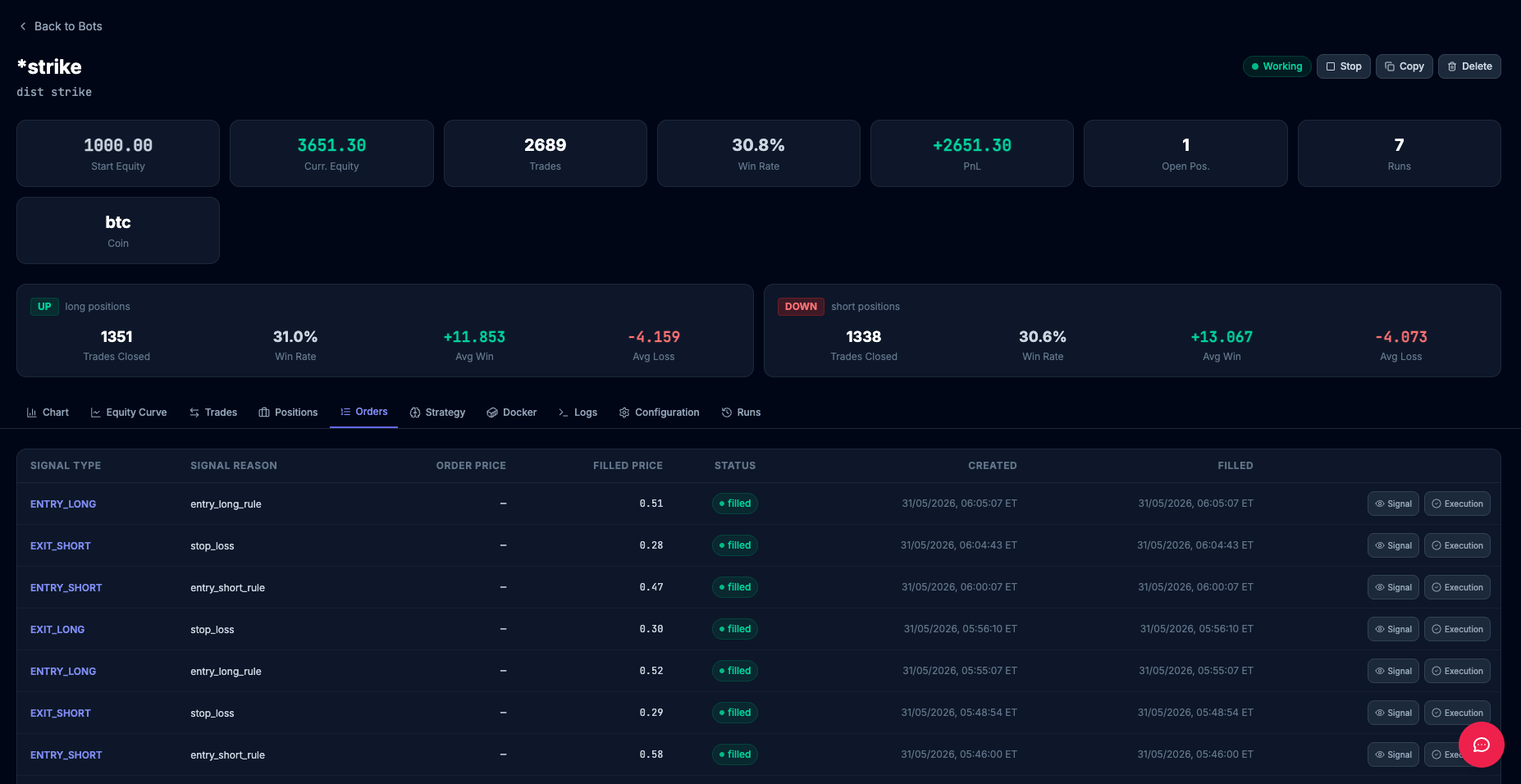 An Up/Down bot card, Orders tab: each entry and exit with its rule, fill price and status. Signal shows why it fired. Demo numbers.
Copy bots
| Tab | What’s there |
|---|---|
| Overview | Capital at work, the bot’s P&L curve, capital allocation by market |
| Signals | Every leader trade and your bot’s decision, with the reason |
| Positions | Open and closed positions with both fees |
| Ledger | Every money movement: buys, sells, fees, payouts, deposits, withdrawals |
| Quality | How closely the bot mirrors the leader: coverage, slippage and three result lines |
| Settings | All copy settings |
| Configuration | The bot’s wallet, changeable only while stopped |
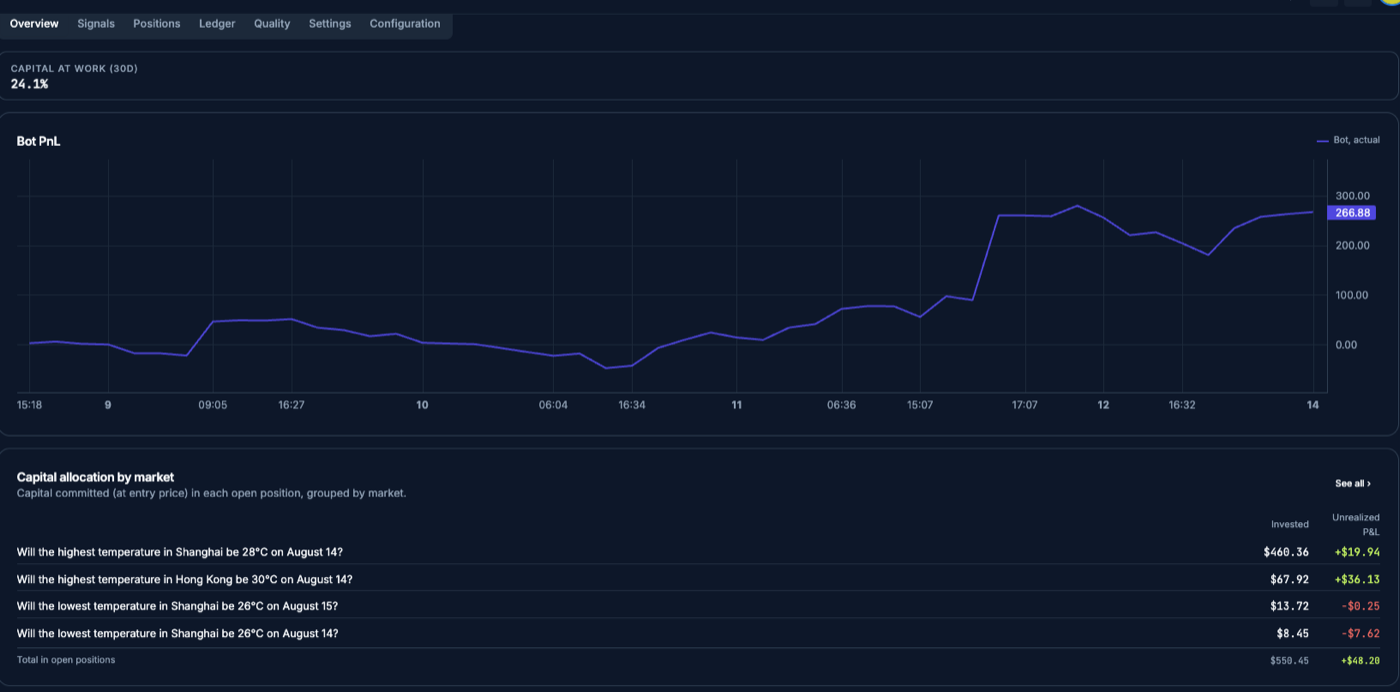 Copy bot Overview: capital at work over 30 days, the bot’s P&L curve and where the capital sits.
See Copy bots.
Arbitrage bots
The top shows the Result for all time and a one-line diagnosis, such as “in profit, mostly from funding” or “In the red because of fees”. Below it are three lights:
| Light | What it tells you |
|---|---|
| Profit | In profit or in the red, and how many deals were profitable |
| Execution | Failures in the last 24 hours: failed second legs, liquidations. Refusals to enter aren’t failures. |
| Work | Stopped, looking for an entry, or holding deals, with unrealized result |
Tabs: Overview (the cumulative result curve), Deals (every deal with gaps, Price, Funding, Fees, Result and exit reason; expand one for its passport) and Journal (why the bot did or didn’t act). The journal opens on deals and errors; switch to All to see refusals. Hunter and Sniper cards also list their pairs with a status each. See Arbitrage bots.
Strategy bots for crypto and stocks
A line under the name says what the bot is doing now, for example waiting for the next bar to close. Further down are:
- Halt reason with what to do, if a limit or the broker stopped the bot.
- A DCA cycle block (levels filled, average, next level, take profit, stop) or a Grid block (range, cells waiting to buy and sell, cycles, profit before fees).
- The orders table with a Purpose column, such as Grid cell 3 or a protective stop.
- The Event log: every decision, order and error.
Close position on a stopped bot closes its positions and leaves it stopped. See DCA and grid bots.
How to read a card in a minute
- Header: is the result positive, and is the drawdown one you accepted?
- Trade count: a handful of trades proves nothing either way.
- What lost: fees, slippage, a few large losers or the strategy itself? Expand the worst trades.
- Logs, journal or signals: if the bot is quiet, the reason is there. See Why a bot isn’t trading.