Copy bots
Updated: 2026-11-14
A copy bot repeats the trades of one Polymarket trader, the leader, from your own wallet. When the leader buys, the bot buys the same outcome in the same market about a second later. When the leader sells, the bot sells. You choose whom to copy, how much money the bot gets and which signals it may skip. Copy bots run alongside your other bots, and you can always trade the same markets by hand in Terminal Turbo.
Where to find it
- Choose a leader: Scanner → Leaders, then the leader’s card and passport. See Copy leaders and Leader passport.
- Your bots: My bots → My Copy Bots. Open My Copy Bots →
- Every copied trade: My bots → Copy-bot trades. Open Copy-bot trades →
From a leader to a bot
Press Create Copy Bot on a leader’s card, or Create a bot ▾ → Copy bot on the My bots desk, which opens the list of leaders. The wizard has three steps: Leader wallet → Your wallet → Settings. If you came from a leader’s card, the first step is already done, and Change swaps the leader.
Your wallet
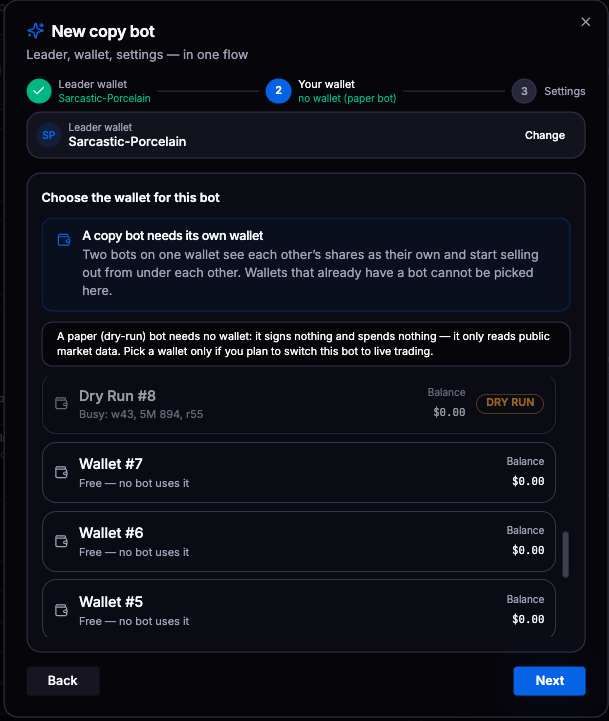 Wallet step: busy wallets are shown but can’t be picked. A dry-run bot needs no wallet.
- Every copy bot needs its own wallet. Two bots on one wallet see each other’s shares as their own and start selling each other’s positions.
- The wallet must have a private key on the platform. The bot signs every order with it, so a wallet added by address only can’t trade.
- A dry-run bot needs no wallet: it signs nothing and spends nothing.
- You can create the bot on an empty wallet and fund it before the live start. See Funding and wallet safety.
Copy size: 1:1 by default
The default is Percentage of the leader’s trade at 100%: dollar for dollar. Every trade of the leader shows up in your account at the same size, including small add-ons. This is the platform’s approach to copying: a faithful, recognizable copy, trade by trade.
A 1:1 copy needs enough capital. The leader’s passport works out how much: it measures the leader’s peak exposure at one time and names a minimum deposit for your copy scale. If you can’t fund that, the honest options are a smaller percentage of the leader’s trade or a different leader.
Other modes exist for other goals:
| Mode | How the size is computed |
|---|---|
| Percentage of the leader’s trade | A share of what the leader put into each trade. Keeps the structure of their bets. |
| Percentage of bot capital | The same share of your capital per position, whatever the leader staked |
| Fixed amount in USDC | The same amount per position; add-ons top it up to that amount |
| Copy the idea — fixed | A fixed stake on the leader’s first entry into a market only |
| Copy the idea — scaled by conviction | The same, scaled by how much larger this entry is than the leader’s usual one, capped at ×3 by default |
While you edit Bot starting capital, the passport under the form updates and shows how many of the leader’s orders and what share of their volume these settings would copy. The bot card also offers Recommendations from the leader’s history, and Apply recommended fills them in.
Main settings
| Setting | Default | What it does |
|---|---|---|
| Minimum trade, USDC | $5 | Smaller copies are skipped. For leaders who average in with small add-ons, lower it toward Polymarket’s $1 minimum. |
| Maximum per position | no limit | A ceiling on one market |
| Max slippage, % / price ($) | 3% / off | How far your price may be from the leader’s. Either one passing is enough. On cheap markets, set the cent tolerance. |
| Maximum signal age | 60 s | Older signals are skipped |
| Max open positions | 10 | How many different markets the bot holds at once |
| Do not enter within, sec | 300 | No new entries this close to the market’s end |
| Entry window within the market’s lifetime | 0–95% | New entries only inside this part of the market’s life |
| Entry price band | no limit | The price range in which the bot may buy. Sells are never blocked. |
| Take profit / Stop loss | off | Your own exit thresholds for one position |
| Max drawdown, % / Daily loss limit, % | off | Stop new entries for the whole bot. Open positions keep being managed. |
| Anomaly threshold, × median trade | off | Skip one leader trade that is far larger than their usual size |
| Cluster cap, % of capital | off | Limit how much capital sits in one market category |
| Copy the leader’s exits | on | Sell when the leader sells |
| Auto top-up of small add-ons | off | Pool add-ons below the exchange minimum and buy them in one order |
Settings are read at start. After you save changes to a running bot, its card shows that the bot is still on the old settings and offers a restart.
Dry run first, then live
At every start you choose DRY RUN or LIVE. Start in dry run: it mirrors the leader with no orders and no money, and shows how many signals your settings let through. Before a live start the platform checks for a simulator run on these exact settings and a measured dry run. If something is missing, you see The bot has not passed the checks and decide whether to Start anyway. See Paper, dry run and live.
How the bot decides: the Signals tab
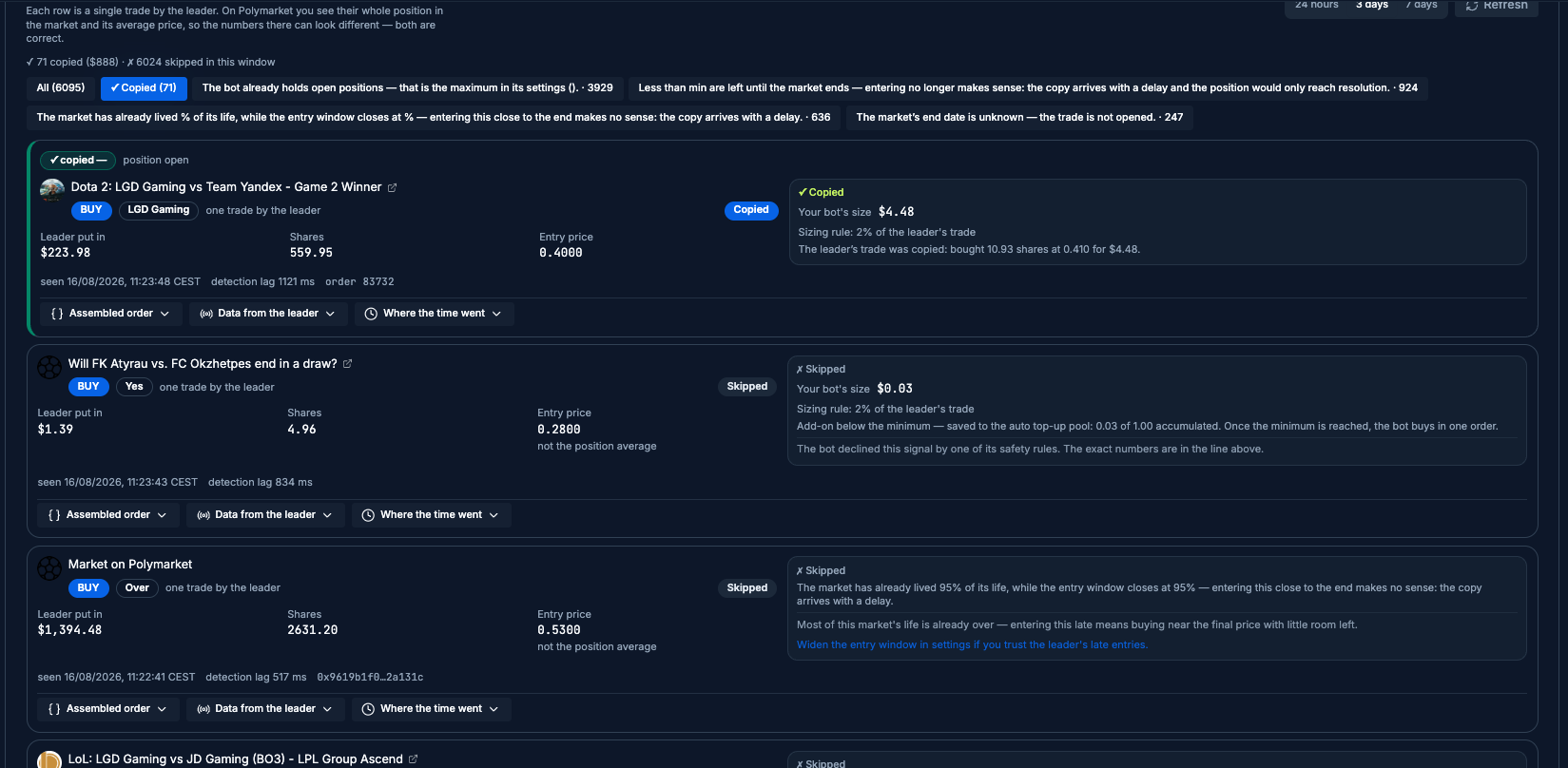 The Signals tab: one row per leader trade, with your bot’s size and why it was copied or skipped.
Every leader trade goes through a fixed chain of checks: risk limits, market state and entry window, signal age, price band, slippage, open-position limit, size and free funds. The first check that fires is the reason you see. Most skips come from settings, not delay: from the leader’s trade to the exchange’s answer the median is under one second.
Nothing blocks an exit. When the leader sells a position you hold, the bot sells at market regardless of limits or tolerance.
The bot copies from the moment it’s created. It doesn’t buy into positions the leader already held before. Leader trades that arrive while the bot is stopped aren’t copied later.
Positions and manual actions
In Copy-bot trades and on the bot card you can:
- Close the trade: the bot sells the position now. The bot must be running, because only it can sign.
- Stop managing: the bot lets go of the position. Nothing is sold, and the position stays on your wallet.
- Top up to target: buys the shares missing up to your scale of the leader’s position. This works only with percentage-of-the-leader sizing.
Stopping a bot that holds positions asks what to do with them. Positions are closed first, then the bot stops.
Reading the result
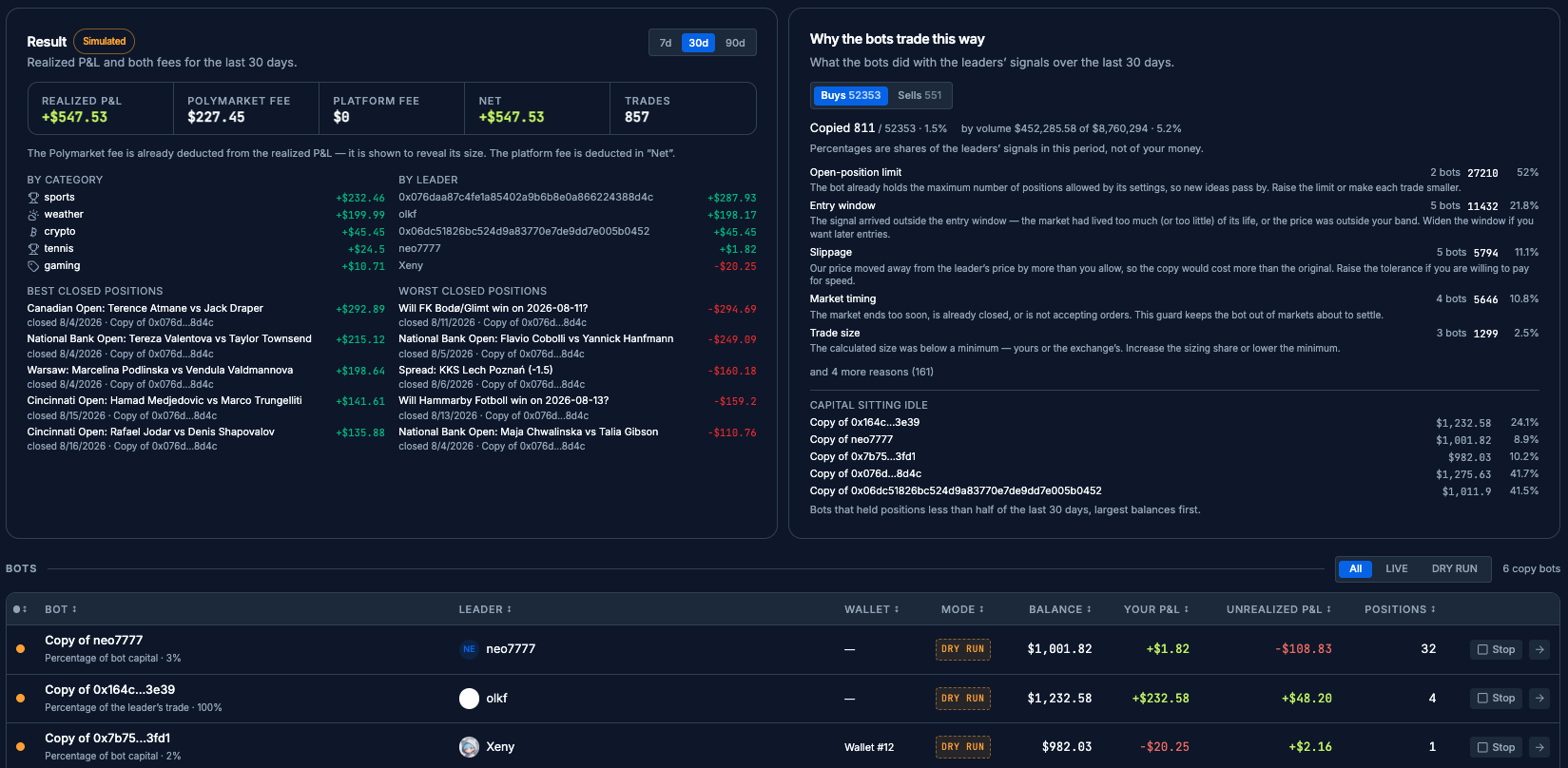 My Copy Bots: realized result with both fees, the signal funnel by reason, idle capital and the bots list. Simulated numbers.
The bot card has seven tabs: Overview, Signals, Positions, Ledger, Quality, Settings and Configuration. Quality answers “why am I behind the leader”: entry coverage, slippage in cents and three result lines (the leader at your size, the bot at the leader’s prices, and the bot in fact). The gap between the first two is the cost of skipped signals. The gap between the last two is the cost of execution.
Limits and risks
- You copy the leader’s choices, including their losing streaks. Past results of a leader aren’t a forecast.
- Each entry costs about a cent per share more than the leader paid. On tokens under 15 cents that cent is a large share of the price.
- A leader who goes all-in pulls a proportional copy all-in too. Use Maximum per position, Cluster cap and the drawdown limits to cap concentration.
- Many leaders never sell and hold to resolution. With exits copied and no take profit or stop loss, your money stays in the position until the market ends.
- Polymarket’s taker fee is deducted from the result. The platform fee follows your plan and is never charged on dry run.
- You get a notification if the leader goes quiet or seems to be gone. Nobody stops your bot for you.