The leader card and copy passport
Updated: 2026-11-14
The leader card is where you decide whether to copy a Polymarket wallet, and with how much money. Its centerpiece is the copy passport: a replay of the leader’s recent history that tells you what deposit you need, how much of their trading you’d actually repeat, and what’s likely to survive the copy. The Simulator tab then runs the leader’s history through your exact bot settings. This article explains every block and number.
Where to find it
Click Open card on any wallet in Leaders, or a row in Saved → Leaders. The card opens as a window next to the list. Open Leaders →
The card has two tabs: Overview and Simulator.
The header
The name and address, Profile on Polymarket, In my list (or Add to my list), Remove from my list and Create Copy Bot. Removing a wallet only removes it from your list. A bot that already copies it keeps running.
If you’ve looked at this leader before, a banner reminds you: when you opened the card, your analyst reports and simulator runs, your bots on this leader, and the reason you gave if you rejected it. It also shows what’s changed since.
Copy readiness
Copy readiness shows five checks between “found a leader” and “trading real money”:
| Stage | Passes when |
|---|---|
| Screener | The wallet isn’t screened out. |
| Passport | Your deposit covers the leader, and the estimated result is positive. |
| Analyst | There’s a fresh report that doesn’t advise against copying. |
| Run | A simulator run on your bot’s settings ends positive on both fee assumptions, without an unsafe drawdown. |
| Dry run | Your paper bot has resolved enough cycles and matches the run. |
Each stage shows OK, Attention, Stop or No data. A stage with no data isn’t a verdict. It just hasn’t been measured yet. What is missing lists what’s left to do. If you start a bot in live mode before the checks pass, the platform shows what hasn’t passed and asks you to confirm.
Metric tiles and chart
The tiles use fixed windows from the last crawl. They can lag live Polymarket by hours.
| Tile | How to read it |
|---|---|
| PnL | Profit for the window. |
| Volume, Trades, Average trade | Activity and typical size. |
| Win rate (30d) | Share of positions with a known outcome that made money. With few closed positions it’s marked low confidence. |
| Max drawdown | The worst fall of cumulative profit from its peak, in dollars, with dates. It isn’t a percentage, because the leader’s capital isn’t public. |
| History depth, First trade | The earliest trade we can see, not the account’s creation date. |
| Profitable months | Calendar months in a row closed in profit, counting back from the latest. |
| Steady growth, smoothness | Profit across four non-overlapping periods, and how straight the yearly curve is. See Finding leaders to copy. |
The Performance chart shows Polymarket’s own PnL series, with a peak and trough marker for the drawdown. Your bots on this leader lists your copy bots and their leader health.
The copy passport
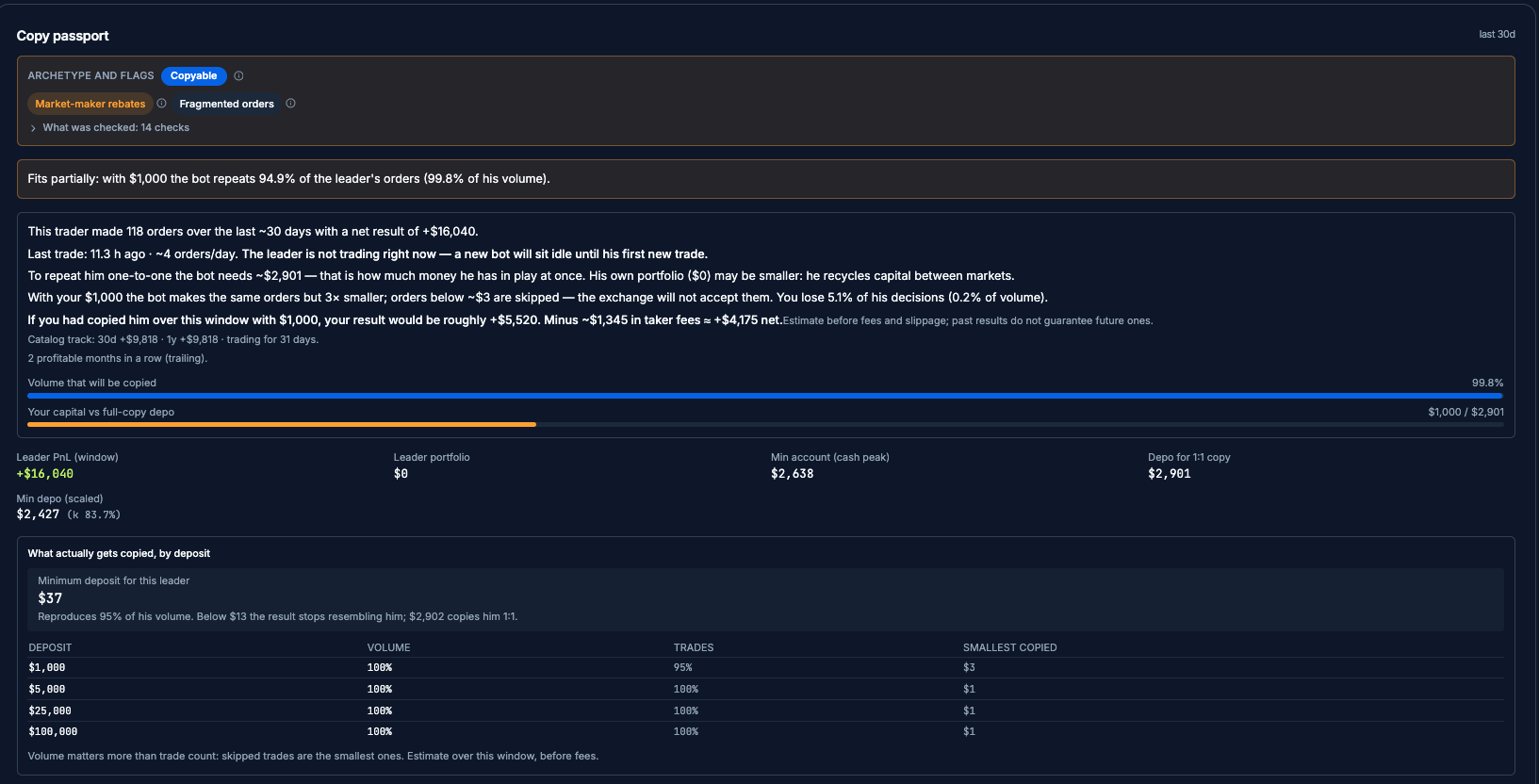 The copy passport: flags, the fit verdict for your capital, and what gets copied at each deposit.
The platform replays the leader’s history as a cash account. Buys take money out, sales and payouts bring it back. It counts orders, not fills: fills of the same token within 60 seconds are grouped into one order, so pieces of a big entry aren’t mistaken for small trades. The window is up to 30 days or the 3,000 most recent events, whichever is smaller. The effective window is shown in the header.
Archetype and flags
The screener verdict (Copyable, Screened out, Not enough data, Not screened yet) and any soft flags. What was checked opens every check with its number and threshold.
The fit line and the story
A one-line verdict for your capital: Fits fully, Fits partially (with the share of orders and volume you’d repeat) or Too big for this capital. Below it, the passport explains in plain words:
- how many orders the leader made, and their net result;
- the last trade and the trading pace. If the leader is idle, a new bot will sit and wait for their next trade;
- the deposit for a one-to-one copy, and why it can be bigger than the leader’s portfolio (they recycle capital between markets);
- at your capital, how many times smaller your orders are, which ones fall below the exchange minimum, and what share of decisions and volume you lose;
- what you’d have made copying this window with your capital, before and after fees.
Two bars sum it up: Volume that will be copied and Your capital vs full-copy depo.
Deposit numbers
| Number | Meaning |
|---|---|
| Leader PnL (window) | The leader’s net cash result over the window. |
| Leader portfolio | The value of their open positions now. Often small, because they recycle capital. |
| Min account (cash peak) | The peak net cash outflow: the account needed to replay their history without going negative. |
| Depo for 1:1 copy | The larger of the cash peak and the peak of open positions, plus 10% for fees and slippage. Above this, copy completeness doesn’t grow. |
| Min depo (scaled) | The smallest deposit at which every trade still fits at a reduced scale k. The leader’s smallest trade dictates it. |
Polymarket won’t accept orders below $1 at market or 5 shares as a limit order. Fills below that are dust: the leader couldn’t have placed them on their own either, so no deposit copies them.
What actually gets copied, by deposit
This is the most important block. Minimum deposit for this leader is the deposit that reproduces 95% of their volume, the practical plateau. The note tells you below which amount the result stops resembling them, and what copies them 1:1.
The table shows $1,000, $5,000, $25,000 and $100,000:
| Column | Meaning |
|---|---|
| Volume | Share of the leader’s volume reproduced. |
| Trades | Share of the leader’s decisions reproduced. |
| Smallest copied | The smallest leader trade that still fits. |
| Net | A light estimate of your result on the copyable part, after fees and with the cash that parallel positions leave free. |
Watch volume, not trade count. The smallest trades are always the ones skipped, so the trade share drops fast while volume stays high. Volume decides whether your result resembles theirs.
Sizing mode comparison
All five copy-size modes simulated on this leader’s real trades, at the same average amount per trade. For each mode you see the volume copied, why trades were skipped, the net result and the maximum drawdown. Setting used is the exact number to enter when you create a bot in that mode. A new bot defaults to Percentage of the leader’s trade at 100%, which is a 1:1 copy.
Window statistics
| Metric | How to read it |
|---|---|
| Window ROI | Window PnL divided by the largest amount the leader had invested at once. |
| Max drawdown | The worst dip of their realized-PnL curve in the window. |
| Win rate | Profitable market cycles, with a 95% confidence interval. If the interval covers 50%, or the breakeven win rate for their average entry price, the sample can’t tell this leader from a coin flip. |
| Breakeven win rate | At their average entry price, the share of positions that must win just to break even before fees. |
| Avg hold | Average time from entry to full exit. Positions still open at the edge aren’t counted, so it’s biased low. |
| Survives to copier | The measured share of the leader’s result left after a copier’s worse entry price. Fees aren’t deducted. |
| PnL stability | Day-to-day variation of PnL over 90 days. Lower is steadier. |
| Peak open markets | The most markets held at once. This is a ready value for your bot’s maximum open positions. |
| Fast intraday | Share of volume in 5–15 minute markets, where a copy gets noticeably worse prices. |
Leader style and execution
- Averages in, Single entry or Mixed. A trader who builds positions over several orders needs a mode that copies add-ons. “Copy the idea” modes take only the first entry.
- Share of cycles held to resolution. A leader who never sells gives your bot nothing to follow out.
- Averages down: adds while the position moves against them. A delayed copy handles that risk worse.
- Result concentration: how much of the profit came from the best one or three trades.
- Entry penalty: the estimated cents per share you’d pay above the leader’s price, the share of volume in the cheap band below $0.30, and where available, a measurement on real order book depth for their markets.
- Order sizes with the dust share, and Category concentration.
Warnings
The passport raises its own flags: the leader isn’t trading now (or hasn’t traded at all in the window); a long-term holder whose portfolio was bought before the window (the bot copies new trades only and never recreates an existing portfolio); a hedging style (a missed hedge leg becomes an unhedged bet); conversions and splits that the cash model can’t see; and cheap positions held to resolution, where a few unlucky outcomes in a row can wipe out a small deposit.
How is this calculated? opens the method in full.
Analyst opinion
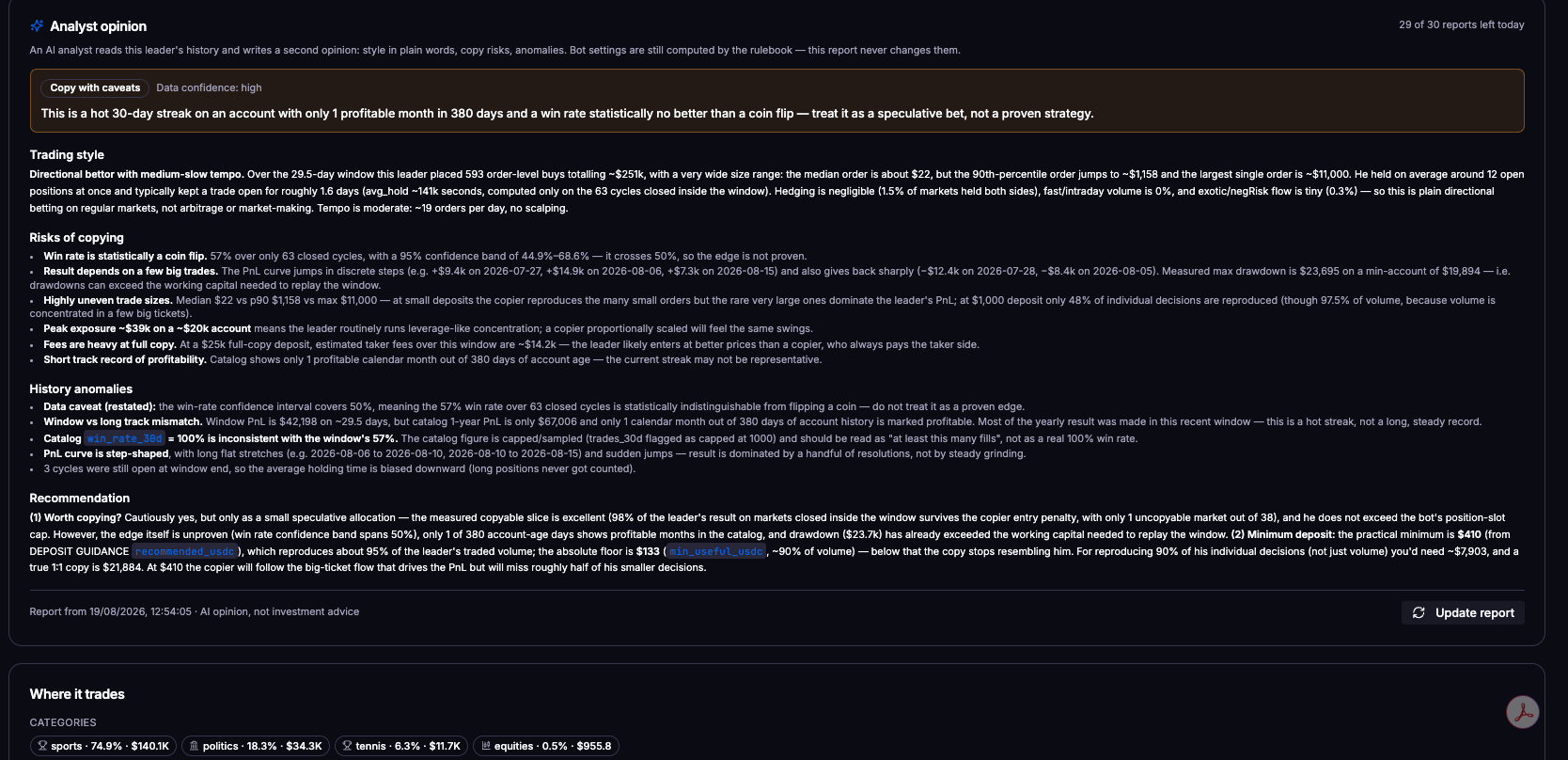 The analyst opinion: a second opinion in plain words. It never changes bot settings.
Press Request analyst opinion. An AI reads the leader’s history and writes the trading style, the risks of copying, history anomalies and a recommendation: Worth copying, Copy with caveats or Better to avoid, with a data confidence level. It usually takes under a minute. There’s a daily report limit, shown next to the title.
The numbers come from the platform. The analyst only explains them. If the leader’s data contradicts itself, no report is issued, and you see why the numbers can’t be trusted instead. It’s an AI opinion, not investment advice.
Observation track and where it trades
Observation track lists how the screener verdict on this wallet changed while we’ve watched it. Where it trades shows categories by money and a table of markets with trades, volume and the last trade.
The Simulator tab
The simulator replays this leader’s trade history under any copy-bot settings and deposit.
- Set Deposit, USDC, the sizing mode and the copy scale or amount. More settings opens Sizing, Entry filters, Risk stops and Exits (TP/SL): every setting a copy bot has.
- Choose One scenario or Comparison grid. A grid varies one or two parameters, up to 5 values each and 25 cells in total, for example deposit × sizing mode.
- Use Find the sweet spot for ready grids (Min deposit, Best mode, Top-up), Run recommended, or Like my bot #N to replay a bot you already have.
- Press Run.
The result starts with a verdict: profit on both bounds, a range straddling zero (unproven), a loss on both bounds, or profit with a drawdown beyond your limit. “A profit you can’t sit through isn’t a profit.” Then:
- Net after fees as a range: the entry penalty at its median and at its 90th percentile;
- Leader, same window, Coverage (vol / count) and Max drawdown;
- how many of the leader’s trades were copied, and a table of skip reasons;
- What the result stands on: whether one trade made the result, and whether the two halves of the window agree;
- top winning and losing trades;
- What to tweak, with an Apply button for each suggestion.
The simulator models taker fees, the measured entry penalty and every bot gate it can reconstruct from history. It doesn’t model the roughly one-second detection lag (the penalty stands in for it) or the live state of a market. Take-profit and stop-loss are approximated from the leader’s later trade prices. Runs are saved under Saved runs, where you can rename, re-run against fresh history or compare them.
From the card to a copy bot
- Create Copy Bot in the header opens the wizard with this leader already chosen.
- Create a bot with these settings in the simulator carries over the settings you just tested.
In the wizard, the passport recalculates live as you change Bot starting capital. On the bot card, Recommended settings explains each suggested value, and Apply recommended fills them in. Start in dry run first. See Copy bots.
Risks
Every number here describes the past, measured on public data. A leader can change style or stop trading, your copy always pays the entry penalty and fees, and a 30-day window can be a hot streak. Size so that the worst drawdown you see here wouldn’t take you out of the game.