Position builder
Updated: 2026-11-17
The Position builder is a Terminal Turbo window for positions with more than one leg. You put options, the coin’s perpetual future, an ETF or a Polymarket market into one combination. Before you send anything, the builder shows what it costs, how much you can lose, where you break even and how the result changes with price, time and volatility. When the picture looks right, one button opens all the legs.
Most mistakes with multi-leg positions happen before the trade: a forgotten short call with unlimited loss, a spread wider than expected, a hedge that expires two days before the risk it covers. The builder’s job is to make those things visible while they still cost nothing.
Who it is for
- New to options. Pick an outlook in the Wizard or start from a named template, and read the result off the chart: green area is profit, red area is loss. You don’t need to price anything by hand.
- Experienced traders. Calendars and diagonals, own strikes between listed ones, IV shift, a P&L heat map by price and date, greeks against price, a delta hedge with the perp, several strategies side by side, and a sandbox for changing positions you already hold.
- Anyone who mixes markets. A Polymarket “No” can hedge a call, and an ETF leg can sit next to crypto options. All legs share one price axis.
Where to find it
- In Terminal Turbo, press Constructor in the header. It brings back the builder window you already have, or opens a new one full screen.
- Or open New window, pick an exchange and choose Position Builder.
- The built-in Options layout opens the builder next to the Options window and a chart.
- On a phone, Turbo’s add-window sheet has the Position builder at the top.
Open the Options layout in Turbo →
The builder always works with one coin, the window’s coin (BTC, ETH and so on), on the window’s exchange. Option chains come from Bybit, Binance, OKX and Deribit. Orders go out on Bybit, Binance and OKX. You can build and study combinations without connecting an exchange. You only need the exchange key when you open the position.
Instead of a coin, the window’s base asset can be a US stock or ETF. Pick Stock / ETF… in the selector at the top left and type a ticker, for example SPY. The price on the chart axis then comes from your Alpaca account, and SPY options and SPY shares in the chain block add legs from your broker. Share legs are sent to Alpaca when you open the strategy. Broker option legs are calculation only for now. Templates and the wizard work with crypto exchange coins only.
The window at a glance
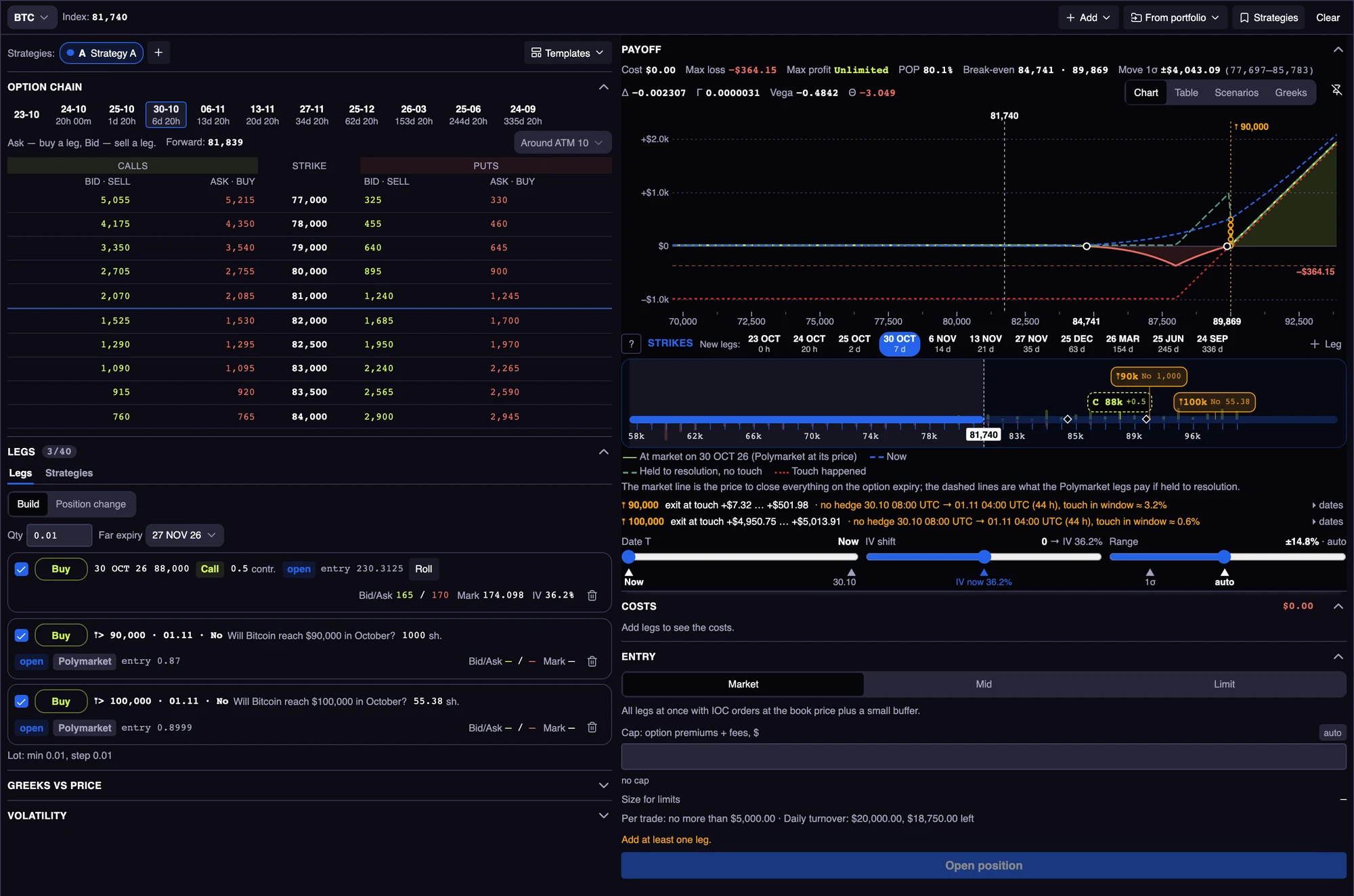 BTC at 81,740. The legs are one long 88,000 call and two Polymarket “No” positions, all loaded from the portfolio. The payoff chart shows the whole combination: max loss −$364.15, profit unlimited above about 89,869.
The top bar shows the coin and its Index price, plus the main menus: Add, From portfolio, Strategies and Clear. Here is what each zone does, from top left to bottom right.
Strategies and templates
Strategies: A Strategy A + is a row of chips. You can keep up to four strategies (A to D) in one window. The active one is highlighted, and its legs are the ones Open position sends. + adds a copy of the active strategy or an empty one. Templates next to it builds a ready-made combination around the current price. There are 24 templates, from Long Call to Iron Condor. See Legs, templates and strategies.
Option chain
Option chain shows the coin’s expiries as tabs, with the time left under each date (for example, “30-10 · 6d 20h”). It also shows the expiry’s Forward price and a strike table: calls on the left, puts on the right. The rule is printed above the table: Ask — buy a leg, Bid — sell a leg. Around ATM 10 sets how many strikes to show around the price (6, 10, 20 or all).
Legs
Legs 3/40 lists everything in the combination. A window holds up to 40 legs. Each row has a checkbox (include the leg in the calculation or not), the side (Buy/Sell), the contract, the quantity, the live Bid/Ask, Mark and IV, and a delete button. Legs loaded from your account carry an open badge and an entry price. Open option legs also get a Roll button. Above the list are Qty (the size for new legs, here 0.01 BTC), Far expiry (the second date for calendars) and the Build | Position change switch.
From portfolio
From portfolio loads positions you already hold on this coin, including Polymarket positions on its price, as legs. They are drawn at their entry price and are not bought again. That is why Cost in the screenshot is $0.00. See Sandbox and position change.
Payoff
Payoff opens with a row of headline numbers: Cost, Max loss, Max profit, POP (chance of profit), Break-even, Move 1σ and the greeks Δ, Γ, Vega and Θ. Below them are four views: Chart, Table, Scenarios and Greeks. The chart’s x-axis is the coin price and the y-axis is your P&L in dollars. The solid line is the result on the expiry date, and the dashed blue line is the value Now. Each metric is explained in Reading the payoff.
Strikes ruler
Strikes is a strip under the chart on the same price axis. The dates across the top are the expiries for new legs. Long legs sit above the axis and short legs below it. Click empty space to add a leg, click a marker to open the leg’s menu, or drag a marker to move its strike. In the screenshot you can see the call marker “C 88k +0.5” and the two Polymarket markers “↑90k No 1,000” and “↑100k No 55.38”. + Leg opens a search across every instrument you can add.
Sliders
- Date T moves the dashed “Now” line forward in time, up to expiry.
- IV shift raises or lowers implied volatility by up to ±50 points (“0 → IV 36.2%” means no shift from today’s 36.2%).
- Range sets how much of the price axis you see (“±14.8% · auto”). There are marks for 1σ and auto.
Costs
Costs breaks down the price of entry before you buy: premium at mid, spread and book depth, fees at your key’s rates, a delivery fee estimate, Instant exit now, and a margin estimate for reference. It shows “Add legs to see the costs.” here because all three legs are already open. See Costs and execution.
Entry and Open position
Entry is where you choose how to send the orders: Market, Mid or Limit. You also set the Cap on what you’ll pay (or the least you’ll receive) and see your trading limits. In the screenshot those are “Per trade: no more than $5,000.00 · Daily turnover: $20,000.00, $18,750.00 left”. Open position shows a confirmation screen first. Nothing is sent until you confirm it.
Two blocks fold out below the legs: Greeks vs price (with a delta hedge) and Volatility (the IV smile and term structure).
Your first combination in five steps
- Pick the coin and expiry. Choose BTC in the top-left selector, then click an expiry tab in the option chain, for example a week out.
- Add the legs. For a bull call spread, click Ask on a call just above the price (buy), then Bid on a call two strikes higher (sell). Or open Templates → Vertical spreads → Bull Call Spread, which does both.
- Read the payoff. Check Cost, Max loss, Max profit and Break-even. Move Date T to see what the position is worth before expiry, and IV shift to see what a volatility drop would do.
- Check the costs. Open Costs and look at the spread, the fees and Instant exit now, which is what you’d lose if you bought and sold back right away. A wide spread on a thin strike can eat most of a small spread trade’s profit.
- Open the position. Pick an entry method, leave the cap on auto or set your own, press Open position, review the confirmation and confirm. When every leg fills, the combination appears as a group in the Portfolio window.
Limits and risks
- Model figures are estimates. Chance of profit, the “Now” line, scenarios and the heat map come from an option pricing model with implied volatility as it is today. They describe what the market is pricing in, not a forecast.
- Selling options can cost far more than you collect. The builder lets you sell uncovered calls and puts. It warns you (“Unlimited loss”, “Uncovered short call”), but it doesn’t stop you.
- Margin is a reference. The margin figure doesn’t block entry. Your exchange decides the real margin and can reject a leg.
- Multi-leg orders are not atomic. Legs can fill partly. The builder asks you what to do when that happens.
- Fees and spreads are real costs on entry and again on exit. Option books are thinner than the coin’s own market.