Legs, templates and strategies
Updated: 2026-11-14
A leg is one instrument in your combination: an option, the coin’s perpetual future, an ETF, or a Polymarket market. This article covers every way to add legs, how to size and change them, and how to keep several versions of an idea side by side. For a tour of the whole window, see Position builder.
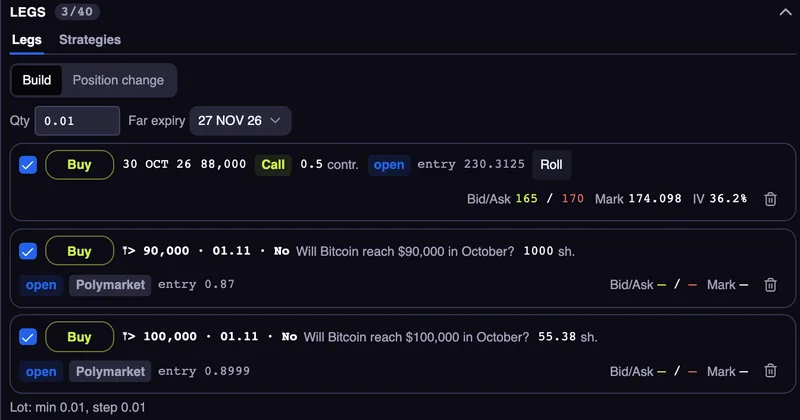 The Legs block: “3/40” is the leg count and the window’s limit. Each leg shows its side, contract, size, entry, and live Bid/Ask, Mark and IV.
Five ways to add a leg
From the option chain
Click a price in the Option chain. Ask buys the option and Bid sells it. The leg is added at the size in Qty above the legs list, for the expiry whose tab is selected. If a strike is already in the combination, the cell says so.
The chain shows a band of strikes around the price. Use Around ATM to switch between 6, 10 or 20 strikes, or all of them. With all strikes on, the table scrolls, and the header stays put.
From the strikes ruler
The Strikes strip under the chart shares the chart’s price axis.
- Click empty space to open a New leg dialog. It has the option type, side, expiry, strike, quantity, and the cost including the taker fee.
- Click a leg marker to open its menu.
- Drag a marker to move the strike. The side stays the same, so a bought call never silently becomes a sold one. Shift while dragging moves a mirror leg too, and Alt turns off snapping to strikes, price and break-evens. The ←/→ keys step to the neighbouring strike.
- Ctrl/⌘ places an own strike between listed ones. The builder prices it from the volatility smile. An own strike is for calculation only and can’t be sent as an order.
The dates across the top of the ruler set the expiry for new legs. With a leg selected, clicking a date moves that leg to the new expiry.
Templates
Templates (next to the strategy chips, or in Add) builds a whole combination around the current price for the selected expiry. The strikes come from that expiry’s chain. Picking a template replaces the current legs. There are 24 templates:
| Group | Templates |
|---|---|
| Single option | Long Call, Long Put, Short Call, Short Put |
| Vertical spreads | Bull Call Spread, Bear Put Spread, Bull Put Spread, Bear Call Spread |
| Volatility | Long Straddle, Short Straddle, Long Strangle, Short Strangle |
| Range-bound | Iron Condor, Iron Butterfly, Long Call Butterfly, Long Put Butterfly, Broken Wing Butterfly (Call), Jade Lizard |
| Time (two expiries) | Call Calendar, Put Calendar, Call Diagonal, Put Diagonal |
| With the underlying | Covered Call, Protective Put |
In Covered Call and Protective Put, the “underlying” leg is the coin’s perpetual future, not spot. A perp has funding and its own margin. Time templates need a Far expiry later than the selected one. Otherwise you’ll see “This template needs a far expiry later than the near one”.
The wizard
Add → Wizard asks three questions:
- Outlook. Price will rise, Price will fall, Sideways, Volatility spike, or Volatility drop.
- Horizon. Which expiry.
- Risk. Limited loss means every sold option is covered and the maximum loss is known in advance. Any risk also shows uncovered sales, where the loss can be large or unlimited.
It then suggests matching templates, each with a one-line reason. Templates marked “high risk” carry uncovered sales. If the expiry is less than two days away, the wizard warns that gamma is high and a small move can flip the result.
Add → Leg… and the underlying
Add → Leg… (also + Leg on the ruler) searches every instrument you can add. That covers the coin’s options on each exchange, the perp, Polymarket markets on the coin’s price, spot ETFs on the coin and options on them, other US tickers, and CME futures. The result list marks which legs can be traded from this window and which are for calculation only. Underlying adds the window exchange’s perpetual on the coin.
From portfolio
From portfolio loads positions you already hold. You can also pick All BTC positions · N to load all of them in one click. Loaded legs are marked open, priced at their entry, and not bought again. See Sandbox and position change.
Quantity, lots and units
- Qty above the list is the size for new legs. Each leg’s own quantity can be changed in its row or menu.
- Option quantity is in coins of the underlying. On Bybit one contract is one coin. On OKX the window shows the contract size, for example “1 contract = 0.01 BTC”.
- The line under the list shows the exchange’s lot, for example “Lot: min 0.01, step 0.01”. A size below the minimum blocks sending (“Quantity is below the minimum lot”).
- Polymarket legs are sized in shares (each pays $1 if it wins), or in dollars in the picker.
- OKX and Deribit quote options in the coin. The builder shows dollars at the coin index and converts back when it sends an order.
Expiries and calendars
Each option leg has its own expiry. A calendar sells a near expiry and buys a later one at the same strike. A diagonal does the same with different strikes. To build one, choose the near expiry tab and set Far expiry, then use a Time template, or add the far leg by hand.
The chart’s solid line is drawn at the nearest leg expiry. At that moment the far leg still has time value, and the builder prices it with the model. This makes calendars sensitive to volatility: use IV shift to see what happens if far-dated IV falls.
The leg menu
Click a leg (in the list or on the ruler) to open its menu:
- In calculation / Hidden. Switch the leg off without deleting it. The checkbox in the list does the same.
- Quantity with Less/More, and Close all for an open leg.
- Own entry price. A “what if I’d entered at X” price for the calculation. It’s never sent as an order.
- Add nearby. Add a strike below or above, the next expiry, the opposite type (put/call), or the opposite side.
- Expiry / strike… to move the leg.
- To another strategy. Move to or Copy to strategy B, C or D.
- Remove leg, plus Flip all sides to turn the whole combination around.
Roll an open option
An option leg loaded from your account has a Roll button. Choose a New expiry and/or New strike and a quantity, up to the full position. The dialog shows the closing and opening trades, net premiums, spread, fees, and the total (“Roll costs you” or “Roll pays you”). It also shows the result on the part you close. To builder adds both trades as legs. Nothing is sent until you press Open position. If you roll only part of the position, the rest stays as it is.
Build vs Position change
The switch above the legs has two modes:
- Build puts together a new combination. Everything you add is bought or sold when you press Open position.
- Position change works on positions you already hold. Each leg shows the fact (what’s on the exchange) and your model (the quantity and entry you’re testing). Execute change sends only the difference. See Sandbox and position change.
Strategies A, B, C, D: compare ideas side by side
One window can hold up to four strategies. The chips at the top (Strategies: A Strategy A +) switch between them. + creates a Copy of the active one or an Empty strategy. Only the active strategy’s legs appear in the legs list, and only they are sent by Open position.
The Strategies tab in the Legs block puts them in one table:
| Column | Meaning |
|---|---|
| Cost | What you pay (or receive) to enter |
| Max loss / Max profit | Worst and best result at expiry |
| Chance | Model chance of profit |
| Break-even | Prices where the result crosses zero |
| Reward/risk | Max profit divided by max loss |
| P&L · T | Value at the chart’s Date T |
| Δ, Θ | Delta and daily theta |
Every strategy can draw its own line on the chart, so you can see, say, a bull call spread and a bull put spread over each other. On date T for strategies chooses whether the “Now/T” curve is drawn for all strategies or only the active one.
Strategies are saved automatically as ideas. My ideas, in the Strategies tab, lists them across all coins, with filters for Active, Drafts, In trade and Archive. You can open several at once. Closing a strategy in the window keeps the idea. Delete or archive it from My ideas.