Your money in one place
Updated: 2026-11-14
Money is where you see all of your money at once: Polymarket wallets, crypto exchange accounts, broker accounts, and everything your bots and your own manual trades did with them. It answers four questions. How much do I have? Why did it change? What is open right now? What did my closed trades earn?
Every number on the desk comes from one book of events: account snapshots, transfers, trade closes, funding and the platform fee. That means the windows agree with each other, and when something can’t be explained, the desk says so instead of hiding it.
Where to find it
Click Money in the main menu. It opens the My money desk, a screen of free-floating windows that works like Terminal Turbo.
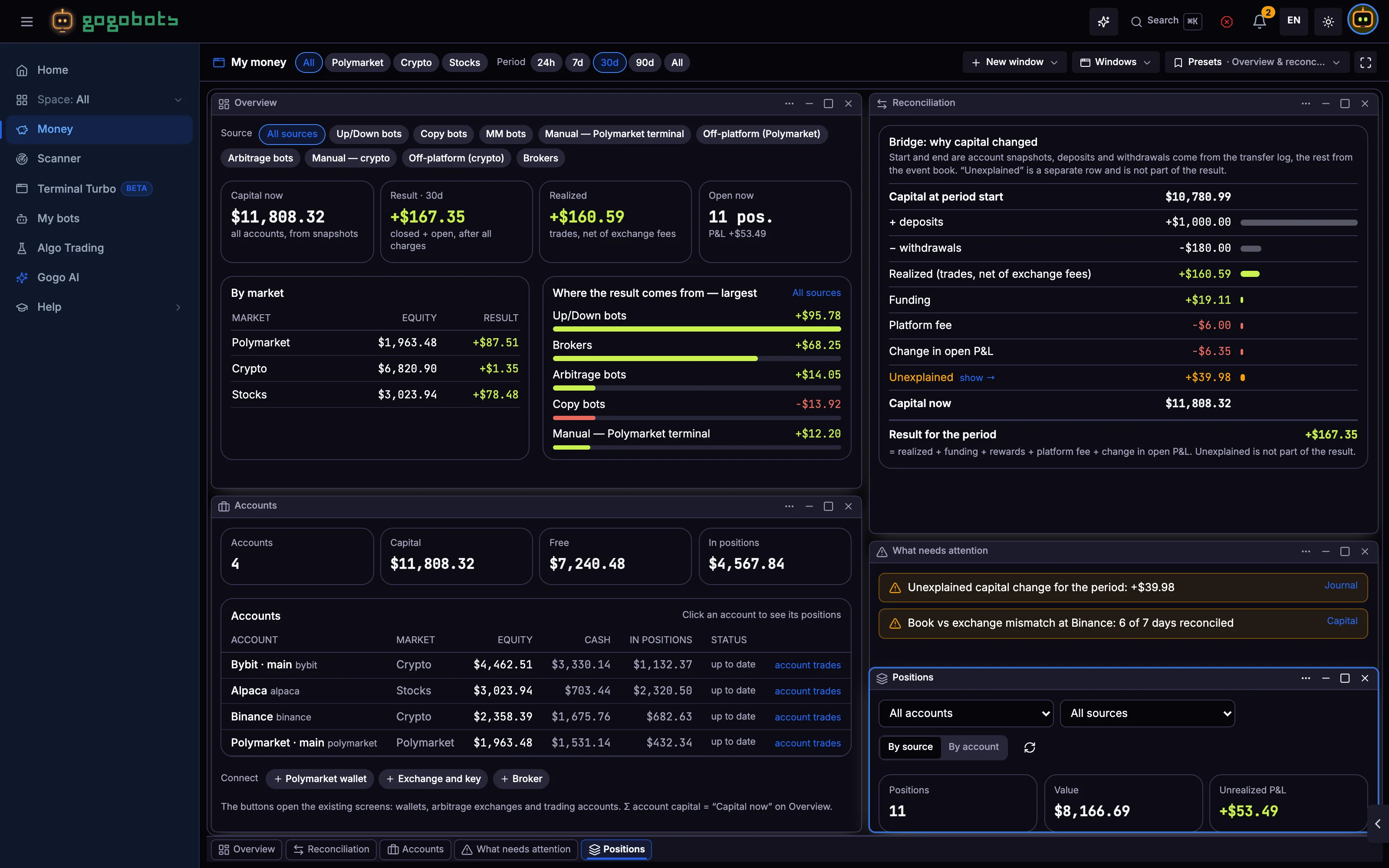 The Money desk: result by source on the left, the capital bridge on the right, accounts and positions below. The numbers are a demo.
The header
The header controls every window on the desk at once.
| Control | What it does |
|---|---|
| Market: All · Polymarket · Crypto · Stocks & derivatives | Filters every window to one market. |
| Period: 24h · 7d · 30d · 90d · All | The window for results and the bridge. 30d is the default. |
| New window | Adds a window from the catalog below. |
| Windows | Lists the open windows so you can jump to one. |
| Presets | Built-in and saved layouts. |
The market and the period are part of the page address, so a link you share opens the same view.
The windows
The catalog has three groups.
My money
| Window | What it shows |
|---|---|
| Overview | Four tiles: Capital now, Result for the period (closed plus open, after all charges), Realized (trades, net of exchange fees) and Open now. Below them, the result by market and “Where the result comes from — largest”. |
| What needs attention | Positions close to liquidation, unexplained capital change, accounts with stale snapshots, days where the trade book and the exchange disagree. Each line links to the window that explains it. |
| Capital curve | Total capital over time, with deposits and withdrawals marked. |
| Reconciliation | The bridge from starting to ending capital. See Reconciliation. |
| Sources | The result split by where it came from: Up/Down bots, copy bots, arbitrage bots, manual Polymarket terminal trades, manual crypto trades, brokers, and trades made outside the platform. |
| Positions | Open positions grouped by source or by account. |
| Exposure | Your real position in each asset across every market. See Exposure. |
| Journal | The event book: trades, funding and the platform fee. See Journal. |
| Accounts | Every connected account with capital, free cash, money in positions and status. The Connect buttons add a Polymarket wallet, an exchange key or a broker. |
| Simulations | Dry-run and paper bots. Simulations are not money, so they never reach Overview, Sources or Journal. |
Classic pages hold the full screens: Capital, Positions (classic), Diary (the full closed-trade journal) and Arbitrage overview.
Connections hold Wallets, Exchanges & keys, Trading accounts and Brokers.
Every window has Open as a page at the bottom if you want it full screen.
Presets
| Preset | Windows |
|---|---|
| Summary (default) | Overview, What needs attention, Capital curve, Positions, Sources |
| Arbitrage | Arbitrage overview, What needs attention, Positions, Journal (market set to Crypto) |
| Polymarket | Overview, Positions, Journal, What needs attention (market set to Polymarket) |
| Exposure | Exposure across the whole desk |
| Reconciliation | Reconciliation, Capital and Journal side by side |
Arrange your own layout and choose Save as my preset… in Presets. Presets are stored on the server and show up on all your devices.
Right-click a window title for the wheel: minimize, maximize, snap, open as a page, move to another monitor, close. Right-click the desk header for window groups and presets. Windows can live on several monitors, just like in Turbo. See Desk windows and Layouts and monitors.
Home or Money?
Both show money, but they do different jobs.
- Home is the short answer to “what’s going on and where should I look”. It shows capital and its change, a one-line bridge, what needs action, upcoming events such as expiries and market ends, where money is working by market, and the activity feed. It doesn’t compute anything of its own: it reads the same book as Money.
- Money is the detailed account. Open it when you want to know exactly why a number is what it is, check one account, close positions or export your trades.
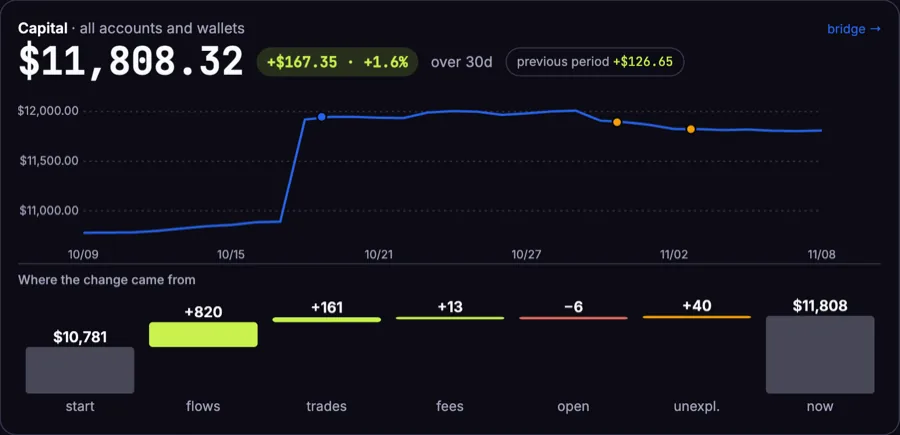 The capital card: the curve with deposits marked, and where the change came from — flows, trades, fees, open P&L and the unexplained part. Demo numbers.
Why numbers differ between screens
Different windows answer different questions, so their “P&L” is built differently:
- Capital counts everything that moved account balances, minus deposits and withdrawals.
- Journal counts only closed trades, after fees. No funding, no open positions.
- Positions shows only the open result.
- A bot card shows that bot’s own result since launch.
When two numbers disagree, check which question each one answers before assuming an error. The Reconciliation window shows how the pieces add up.
Limits
- Dry-run and paper money never appear in capital or the journal. They have their own Simulations window.
- Balances are snapshotted every 15 minutes. Right after you connect an account, the history is short.
- Some deposits that an exchange doesn’t report are estimated from snapshots and marked as estimates. See Capital and positions.
- A broker account in a currency other than USD is shown in its own currency and isn’t added to the dollar total.