Finding leaders to copy
Updated: 2026-11-14
A copy bot mirrors the trades of one public Polymarket wallet with your money. Choosing that wallet, the leader, matters more than any bot setting. You can change settings in a minute, but a bot can’t be switched to another leader: you’d create a new bot. This article covers where leaders come from, how the platform screens them, and the method that separates a trader who made money from a trader whose trades you can actually repeat.
Where to find it
Open Scanner and add the Leaders window from the Polymarket group of New window (it’s also in the Polymarket preset). Open Leaders →
Your own list of wallets is under Saved → Leaders. Open My list →
The main idea: profitable isn’t copyable
A copy always arrives after the original. On this platform the gap between the leader’s trade and your order is about a second in the typical case: a median of 0.95 s, with 95% of copies within 1.77 s. In that second the price usually moves against you. Measured on real copy executions, the typical penalty is about one cent per share.
That cent is absolute, not proportional, and it changes everything:
- At a price of 0.50, one cent is 2% of the price. Most of the leader’s edge survives.
- At 0.90 and above, the leader wins often but earns only a few cents per share. One cent of penalty eats a large part of the profit, and a single loss wipes out many wins.
- Below 0.15, one cent is more than 6% of the price. Cheap longshots are the most expensive thing to copy.
So the question isn’t “how much did this wallet make?” It’s “how much would I have made repeating the trades I could actually get, at the prices I’d actually get?” The platform calls that the copyable slice, and it can be thin or negative even when the leader is firmly in profit. Ranking wallets by raw profit and ranking them by copyability can give almost opposite lists.
What a copyable leader looks like
| Look for | Avoid |
|---|---|
| Entries mostly in the middle of the price range, roughly 0.30–0.70 | Most volume at 0.90+ (selling near-certain outcomes) or at 0.10 and below (lottery tickets) |
| An edge that plays out over hours or days | Scalping, high-frequency trading, the shortest 5–15 minute crypto markets |
| A position built in a few entries | Dozens of orders a minute, heavily fragmented fills |
| Profit from directional trading | Profit from rewards, rebates or market making, which a copy doesn’t receive |
| One clear side per market | Baskets of “No” legs (negRisk), split/merge operations, both sides at once |
| Hundreds of closed trades, and a result spread over many markets | A short hot streak, or most of the profit from one market |
| A trader who is active right now | A wallet that hasn’t traded for weeks |
Two more points from experience. A leader at the top of public rankings is copied by a crowd. When they enter, everyone’s orders push the price the same way, so a less visible leader is often copied better. And in thin markets the leader’s own size plus every copier’s can’t fit in the book, so expect worse fills there.
Judge a leader by the number of trades, not the number of days. A smooth 30-day curve picked out of thousands of wallets is often luck. A hundred or more closed trades says much more than a pretty month.
The leaders catalog
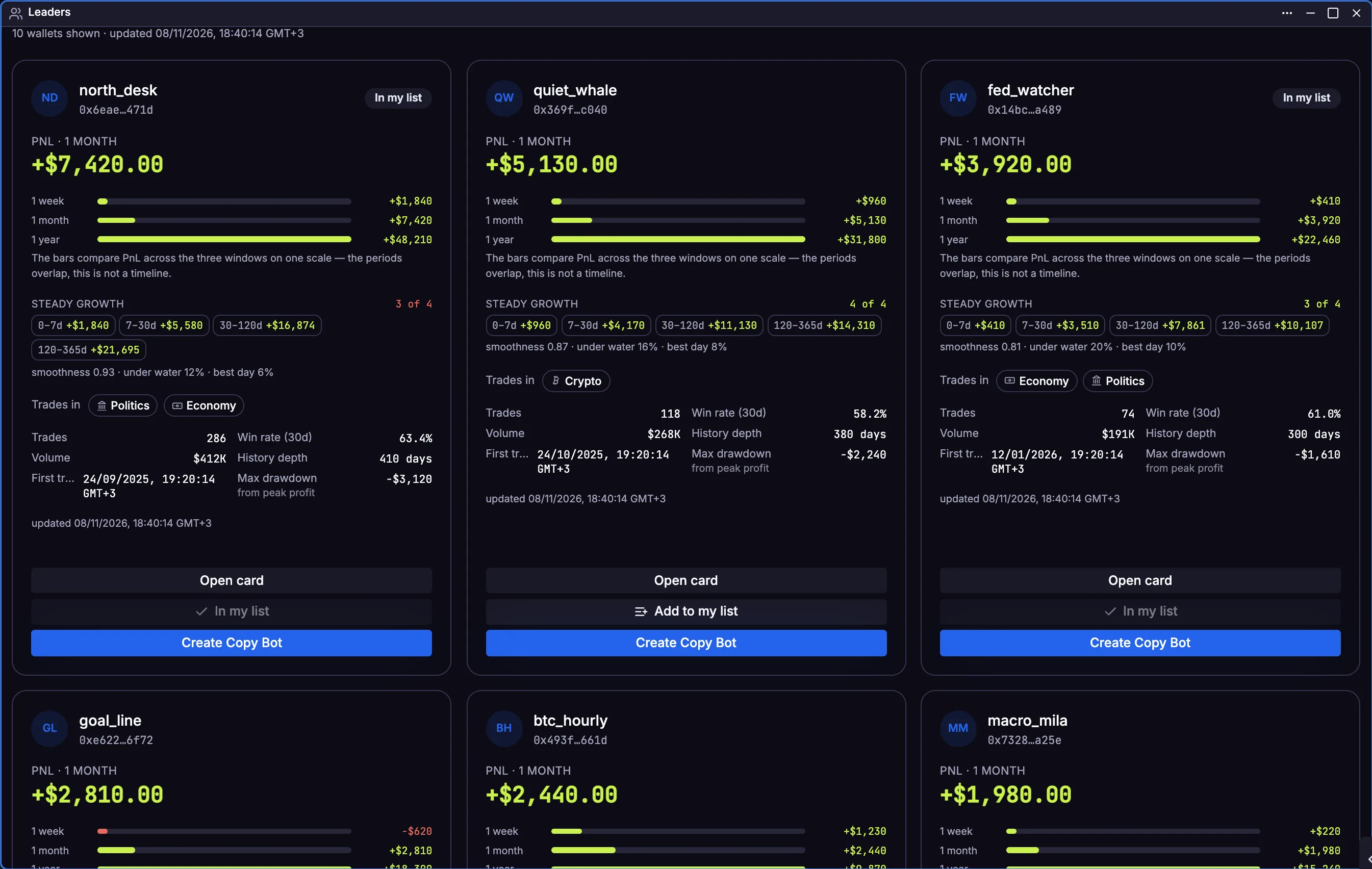 Leaders: one card per wallet, with PnL over three windows and the steady growth check.
The platform fills the catalog itself. It walks the Polymarket leaderboard, category tops, large markets and lists of large holders, computes metrics for each wallet and keeps those who trade long enough and actively enough. The catalog is refreshed in the background. Each card shows when it was last updated.
At the top:
- Catalog or My wallets: the whole catalog or only your list.
- 1 week, 1 month, 1 year: the PnL window. It changes both the big number on the card and the sorting.
- Sorting: By copyability (the default), By PnL, By volume, By number of trades, By drawdown, By date added, By name and Steadiest curve.
- Not in the catalog? Find it on Polymarket adds any wallet to your list yourself.
What’s on a card
| Field | Meaning |
|---|---|
| PnL for the window | The leader’s profit for the chosen window. |
| Three bars | PnL for 1 week, 1 month and 1 year on one scale. The periods overlap, so this isn’t a timeline. |
| Steady growth, N of 4 | Profit in four non-overlapping periods: 0–7d, 7–30d, 30–120d and 120–365d. One lucky day turns all three overlapping windows green at once, but it can’t fake these four. |
| smoothness | How close the last year’s profit curve is to a straight rising line (R², 1.00 = perfect). |
| under water | Share of days in the year when the curve was below its previous peak. |
| best day | Share of the year’s profit that came from the single best day. |
| Trades in | Up to three most frequent categories, by number of trades. |
| Trades, Volume | Activity. “1000+” means the sample hit the Polymarket feed cap, so the exact number is unknown. |
| Win rate (30d) | Share of profitable positions with a known outcome. Win rate alone is misleading near 0.90+ prices. |
| History depth, First trade | How long we’ve seen this wallet trade. |
| Max drawdown from peak profit | The worst fall of cumulative profit, in dollars. It isn’t a percentage: a leader’s capital isn’t public. |
Buttons: Open card (the full card with the leader passport), Add to my list and Create Copy Bot.
The screener verdict
Every wallet gets a verdict under Archetype and flags:
- Copyable: no hard reason to reject it was found. Flags may still apply.
- Screened out: the screener considers trade-by-trade copying pointless here.
- Not enough data: too few trades in the window to judge.
- Not screened yet: the crawler hasn’t reached this wallet. That isn’t a bad sign.
Hard reasons. Failing any one means “don’t copy”:
| Reason | Why a copy fails |
|---|---|
| Structural operator | Splits and merges outcome sets more than it trades. The edge lives in that mechanism, not in single trades. |
| negRisk operator | Builds baskets of “No” legs and converts them. The profit belongs to the whole basket. |
| Earns on rewards | Most of the money comes from rewards and rebates. A copy repeats trades only. |
| High-frequency scalper | Orders less than a minute apart on the shortest crypto markets. The edge is gone before a copy fills. |
| Trades at price extremes | Almost all money sits outside the copyable price band. |
| Dormant | No trades for longer than the analysis window. A bot would sit idle. |
Soft flags are a caution, not a ban: Sells tails, Longshot bets, Crypto scalping, Fragmented orders, Market-maker rebates, Fast tempo, Possible negRisk basket and Profit from one market. Expand What was checked to see each check with its value, threshold and window.
Screened out isn’t blocked. Search and a direct address still find the wallet, and you can still build a bot on it. The verdict is recalculated on every crawl.
Filters
| Filter | Use it to |
|---|---|
| Min. trades, Min. volume, USDC, Min. history, days, Min. win rate, %, Max. drawdown, $, Category | Set the basic bar. |
| Max. dust, % | Cap the share of volume in fills below the exchange minimum. No deposit can copy those. |
| Max. avg hold, h | Prefer faster-cycling traders who are easier to size for. |
| Max. peak positions | Cap how many markets the leader holds at once. This tells you how many slots your bot needs. |
| Max. exotic events, % | Cap split, merge and conversion activity. Deposit estimates fit those styles poorly. |
| Max. min. deposit for 1:1, $ | Show only leaders you can afford to copy exactly. This is the most honest affordability filter. |
| Hide screened out | Hide wallets with a hard rejection. |
| Slow analytical only | Hide crypto scalping and fast-tempo wallets. |
| By archetype | Show only wallets with a chosen code, including ones hidden by default. |
| My exceptions | Keep wallets visible when they’re rejected only for codes you accept. |
| Steady curve preset | Fill in the steady growth filters at once: profitable periods, losing periods, smoothness, time under water, best day share and profitable months in a row. |
| My history | Hide leaders you’ve rejected, or show only new ones. |
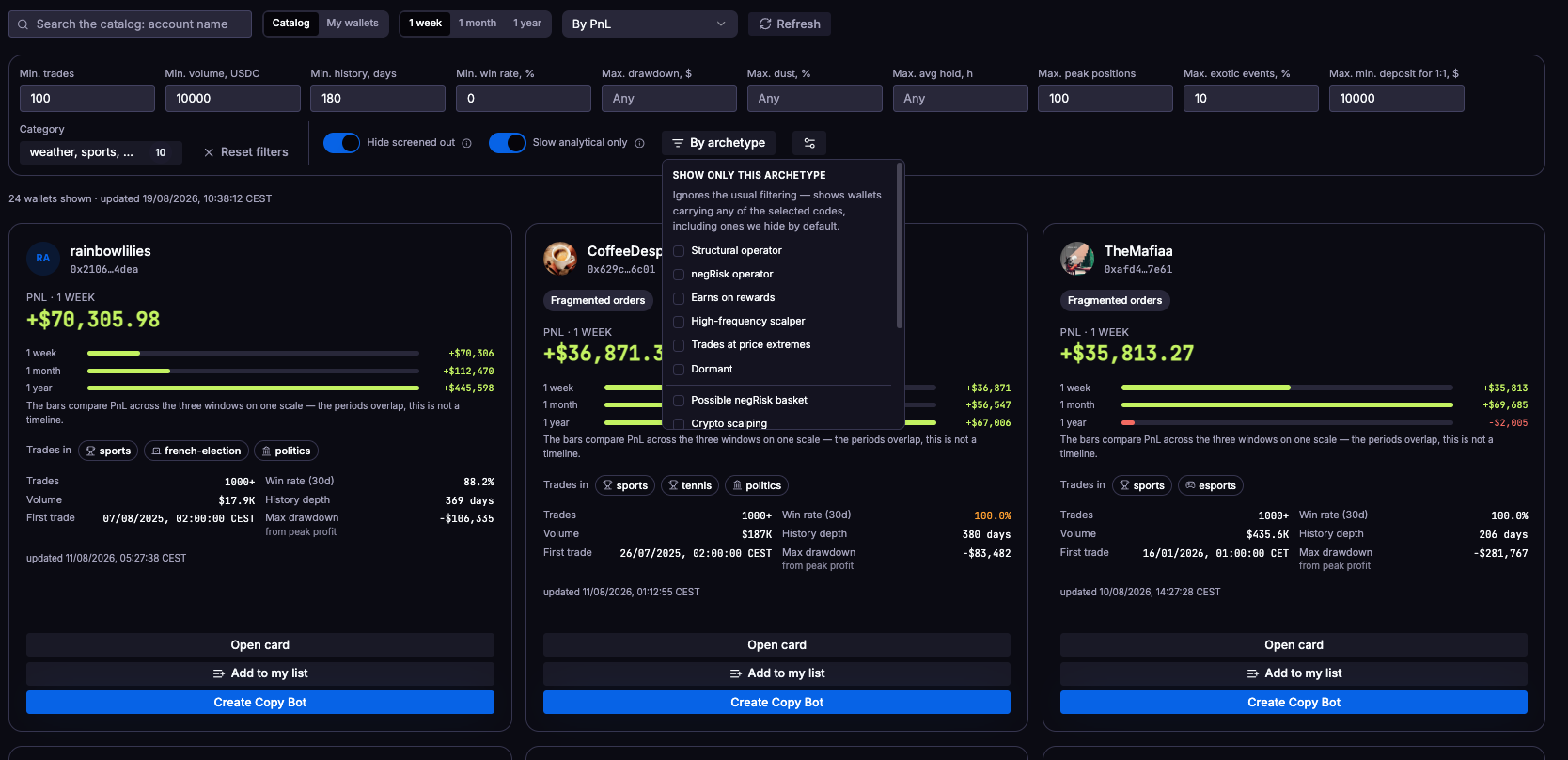 The catalog with its filter panel and the “By archetype” menu.
My list
Only a wallet in your list can be copied. Add one with Add to my list on a card, or search in My list by account name (lex-tang), wallet address (0x…) or Polymarket profile link. The list holds up to 50 wallets.
Each row can carry a star, tags and a private note. Nobody else sees them. Filter by them, or turn on Favorites only. The Copy bot column shows whether you already copy that wallet. A newly added wallet gets metrics right away. If Polymarket is slow, it shows collecting history and the numbers arrive in the background.
When you remove a wallet, you can give a reason and a note. If you come across that leader again, the card reminds you why you dropped them and what’s changed since.
The platform doesn’t vet or recommend wallets. Adding one is your decision, and the platform only calculates statistics on it.
A selection routine
- Start from By copyability, with Hide screened out and Slow analytical only on.
- Set Max. min. deposit for 1:1 to what you’re actually willing to put in.
- Look for steady growth in at least 3 of 4 periods, and a few hundred trades.
- Open the card. Read the leader passport, the flags and the analyst opinion.
- Run the Simulator with your deposit and settings.
- Create the bot in dry run first and let it collect trades. Compare it with the simulation before you use real money. See Copy bots.
You can also copy nobody and simply trade the same markets yourself in Terminal Turbo.
Risks
- Past results don’t guarantee future ones. Leaders change style, lose form or go quiet.
- Every copy pays the entry penalty and Polymarket’s taker fee. Your result will be below the leader’s.
- Two leaders betting the same events are one risk bought twice. Spread across genuinely different traders, and watch the combined exposure.